LED display front service vs rear service is a site-access decision, not a simple product ranking. Front service lets technicians remove modules and other designed components from the viewing side, which often suits flush indoor walls and sites with no rear corridor. Rear service gives technicians access behind the cabinets, which can suit large fixed screens when the structure includes a safe maintenance path.
The right choice depends on the wall depth, structure, ventilation, cable routes, weather exposure, working height, shutdown plan, replaceable parts, and who will maintain the display. Buyers should approve a complete service procedure—not only a quotation line that says “front maintenance” or “rear access.”
What do front service and rear service mean?
A front-service LED display is designed so specified parts can be reached from the image side. Depending on the product, a technician may use a vacuum tool, magnetic tool, release mechanism, or a dedicated key to remove a module. The power supply, receiving card, hub board, cables, or cabinet fasteners may then be reached through that opening—but only if the complete cabinet was designed for it.
A rear-service LED display uses doors, panels, or open frames on the back of the cabinets. Technicians work from a corridor, platform, catwalk, lift, or other planned access position behind the screen. Rear access can make components and cable routing easier to see, but the building and structure must preserve a safe route for the full service life.
Some products offer access from both sides, while others provide front access only to the LED modules and rear access to power or control parts. Ask for the service scope by component. The phrase on the data sheet is not enough.
Which project facts should be checked before choosing?
Start with the installation rather than the cabinet. A service method that works in a showroom may fail after the screen is recessed into joinery, mounted high on a façade, or surrounded by other equipment. Record these inputs before requesting a final configuration:
- Indoor or outdoor environment and expected exposure
- Finished wall depth, recess dimensions, trim, and nearby obstructions
- Screen width, height, mounting level, and reachable service zones
- Structural frame, load path, cabinet attachment, and installation sequence
- Available rear corridor, entry points, platform, lighting, and fall protection
- Front working area, furniture, audience barriers, traffic, and lift access
- Ventilation path and whether service panels affect airflow
- Power and signal routes, cable bend space, isolation points, and labeling
- Parts expected to be replaced onsite and the tools required
- Allowed shutdown window, staffing, spare-parts location, and response responsibility
These details should appear on a coordinated drawing. “No space behind the wall” may support front service, but it does not prove that the proposed cabinet, frame, connectors, cooling path, and decorative finish will fit within the remaining depth.
When does front service usually fit better?
Front service often fits conference rooms, broadcast sets, command rooms, retail feature walls, reception areas, and other installations where the LED wall must sit close to a finished surface. It can avoid a permanent rear corridor and may let technicians work from the occupied room.
The advantage is strongest when every routine replacement can be completed from the front without removing unrelated cabinets. Buyers should watch a technician remove and reinstall a center module, a corner module, a power or control component, and a cabinet-level part that may fail. Check that the tool can reach every position after trims, speakers, cameras, furniture, or ceiling features are installed.
Fine-pitch indoor displays make alignment especially important. Repeated removal must not leave raised edges, damaged pixels, color mismatch, or visible seams. For this type of project, compare the display, mounting tolerance, viewing distance, and service method together. The fine-pitch LED display page provides a useful product context for those discussions.
When is rear service the stronger choice?
Rear service can be practical for large outdoor billboards, stadium screens, building-mounted displays, and indoor structures that already include a protected maintenance corridor. A technician can view cabinet doors, power units, control hardware, cable trays, and structural connections directly from behind. This may simplify diagnosis and organized cable replacement.
The benefit only exists when the access route is real. A narrow void that cannot be entered safely is not a maintenance corridor. The design should define how people enter, stand, carry parts, isolate power, use tools, reach upper and lower cabinets, and leave during an emergency. Working platforms, lighting, ventilation, guardrails, ladders, lifts, and local safety requirements belong to the installation scope, not the cabinet specification.
For an outdoor LED display, also verify how rear doors, seals, drainage, cable entries, and ventilation remain protected after repeated service. A rear door is useful only if technicians can open it fully and restore the intended enclosure condition.
Does front service always save installation depth?
No. Front service can remove the need for a person-sized rear corridor, but the display still needs physical depth. Cabinets, modules, power supplies, connectors, mounting hardware, adjustment points, structure, ventilation, cable bends, and architectural finishes all occupy space.
Request a section drawing that shows the finished face, LED module, cabinet, frame, anchor zone, cables, wall, trim, and the path used to install or remove each item. Identify the deepest component and the direction in which it must move. A shallow cabinet can still require more total wall depth if its frame or connector layout is not coordinated.
Rear service is not automatically bulky either. Where a building already has a technical void or catwalk, the display may use that space efficiently. Compare the complete architectural and structural footprint, not just cabinet depth.
How does service access affect structure and alignment?
The frame must support the display while also allowing the required service movement. Front-removable modules need a clear extraction path and a stable cabinet plane. Rear doors need room to open without striking braces, walls, cables, or platforms. Adjustment hardware must remain reachable after the surrounding finish is complete.
Service work can disturb alignment if modules, cabinets, or frame members are forced during removal. Include reference points, approved tools, torque or fastening instructions where applicable, and a post-service visual check. Inspect seams on full white, neutral gray, primary colors, and real content from the intended viewing distance. The guide to LED display cabinet alignment explains how buyers can define visible-seam acceptance before installation.
What must a rear maintenance corridor include?
A useful rear corridor is a maintained working system. It needs an access route, stable floor or platform, sufficient room for the planned task, lighting, environmental protection, organized cables, component handling space, and safe power isolation. The structural engineer, installer, electrician, venue operator, and display supplier should agree who provides each part.
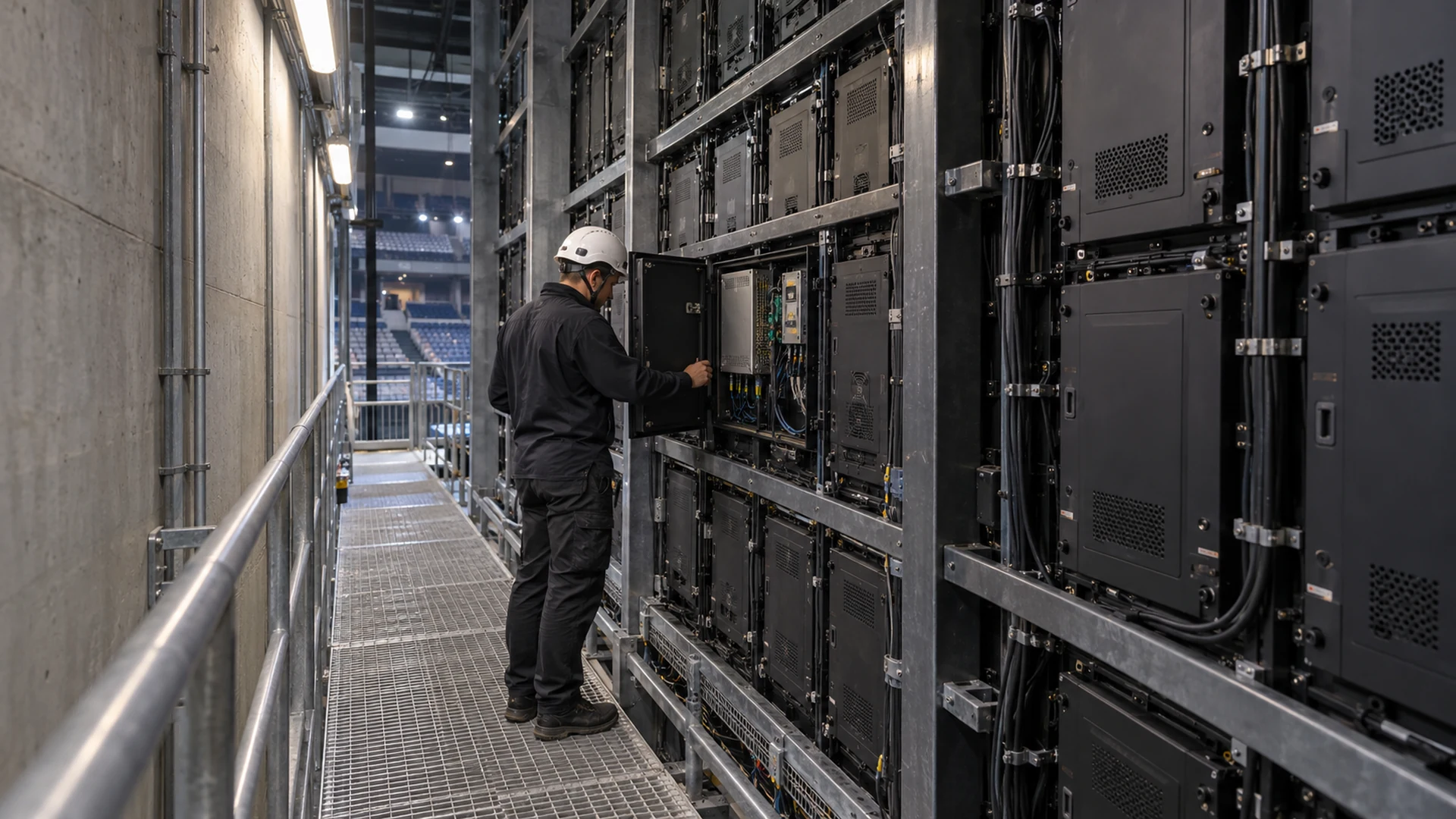
Do not accept a drawing that labels an empty zone “service space” without showing doors, braces, cable trays, entry points, and technician position. Test a representative high, low, center, and edge cabinet. If a lift or temporary platform is needed, state who stores, inspects, and supplies it when a fault occurs.
How do the two methods compare for buyers?
| Decision factor | Front service | Rear service |
|---|---|---|
| Typical site fit | Flush indoor walls or sites without usable rear access | Large fixed screens with a permanent protected access route |
| Space requirement | Front working zone plus cabinet, frame, cables, and ventilation depth | Cabinet and structure plus a usable rear corridor or platform |
| Component visibility | Parts are reached through designed front openings | Rear doors can expose power, control, and cable areas directly |
| Room disruption | Service may occupy the audience or customer area | Work may remain behind the screen when access is independent |
| High-level access | May require a lift or platform in front of the wall | Requires a rear platform, catwalk, ladder, or lift designed for the height |
| Alignment risk | Module removal and replacement technique must preserve a flat face | Cabinet doors and rear work must not push or twist the frame |
| Weather scope | Verify front extraction and enclosure restoration for the offered design | Verify rear doors, seals, drainage, and sheltered working conditions |
| Best proof | Timed demonstration of every required front-side replacement | Full access-route drawing plus a replacement demonstration from behind |
Neither column is universally better. A well-coordinated front-service wall is stronger than a rear-service product placed against an inaccessible wall. A well-designed rear corridor is stronger than front service that requires removing decorative finishes or blocking a public area for routine work.
What should be written into the quotation?
Make suppliers quote the complete access method and boundaries. The service schedule should identify each field-replaceable unit, access side, tool, approximate handling sequence, isolation requirement, personnel or lifting needs, and the parts that cannot be changed onsite.
- Cabinet model, dimensions, weight, access direction, and door or module movement
- Modules, power supplies, receiving cards, hub boards, fans, cables, and connectors included in the service scope
- Required vacuum tools, keys, magnetic tools, test equipment, lifts, or platforms
- Minimum coordinated depth and the supplier’s drawing assumptions
- Frame, trim, ventilation, cable route, access lighting, and isolation responsibilities
- Procedure for replacing high, low, edge, and center components
- Post-service alignment, calibration, configuration restoration, and visual checks
- Spare quantities, storage conditions, labeling, and compatibility controls
- Training, manuals, drawings, configuration files, and escalation contacts
Compare quotations only after these items are aligned. A lower cabinet price may exclude the frame, platform, architectural access, specialist tools, or onsite labor that makes the proposed maintenance method workable.
How should service access be accepted before handover?
Use the real installed geometry, not an open factory table. Select representative positions and have the intended maintenance team perform the agreed tasks. Confirm isolation, tool placement, module or door movement, cable reach, part removal, replacement, startup, configuration restoration, calibration, alignment, and final image quality.
Record the procedure with clear photographs or video, approved tools, part numbers, configuration backups, and sign-off results. Include a response for a component that cannot be removed as planned. The LED display maintenance training checklist helps buyers turn a demonstration into a repeatable handover.
Service access also depends on having the correct replacement parts. Modules that look similar can differ in LEDs, driver ICs, mapping, connectors, masks, calibration data, or firmware needs. Plan compatible stock with the project rather than relying on an unspecified future purchase. Use the LED display spare-parts package guide to define quantities, compatibility records, and storage.
Which service method should your project choose?
The LED display front service vs rear service decision should follow the real access plan. Choose front service when the completed site cannot support safe rear access and the proposed product proves that all required parts can be reached from the front. Choose rear service when the project provides a permanent usable corridor or platform and rear access makes diagnosis, cabling, and component handling more practical. Consider dual-side access only when its exact component coverage is documented.
The decision is complete when the drawing, product, structure, tools, spares, training, and operating plan agree. Send the environment, screen dimensions, mounting height, wall section, available access, ventilation approach, power and signal routes, maintenance team, destination, and schedule when requesting a proposal. Contact Mirun’s project team with those inputs for a configuration and service scope that can be compared properly.
Frequently asked questions
Is a front-service LED display always magnetic?
No. Some modules use magnetic retention and a vacuum or magnetic tool, while other designs use mechanical releases, locks, or product-specific tools. Verify the exact supplied cabinet and practice the removal method before approval.
Can every component be replaced from the front?
Not automatically. Front module access does not prove front access to power supplies, receiving cards, hub boards, internal cables, connectors, or cabinet fasteners. Ask for a component-by-component access schedule and demonstration.
Does a rear-service LED screen need a permanent corridor?
It needs a safe repeatable way to reach every service position. That may be a permanent corridor, catwalk, platform, technical room, lift route, or another engineered access solution. An inaccessible void behind the cabinets is not enough.
Can front and rear service cabinets be mixed?
Mixing may be possible only when the mechanical depth, frame, module system, electrical mapping, calibration, ventilation, and control configuration remain compatible. Treat it as a designed exception and approve the complete transition detail rather than assuming the cabinet faces will align.
Need help choosing the right LED display?
Tell us your installation scene, screen size, pixel pitch target and timeline. Mirun Hailian can help match the right product configuration.