A new LED wall can pass its hardware checks and still disappoint on opening day. A logo looks stretched, the last line of a message disappears, or a familiar landscape video fills only part of the screen. The problem may be the content handover rather than the display itself. The creative team, installer and operator have worked from different versions of “the screen size.”
For a reliable LED display content handover, approve the native pixel map, playback canvas, scaling policy, safe areas and one tested export before producing the full content library. Record who controls each setting. Screen dimensions in meters and a request for “4K video” do not define where every visible pixel will land.
This guide is for buyers coordinating a fixed commercial display or a custom-format LED wall with a content agency. The examples are planning illustrations, not measured results or specifications for a particular product.
Start with three sizes, not one
The physical size describes the installed surface. The native resolution describes its addressable pixel grid. The playback canvas describes the image area generated by the source or media server. These values are related, but they are not interchangeable.
A rectangular wall might contain 2400 × 800 pixels while its processor receives a 3840 × 2160 signal. In that arrangement, someone must specify which part of the incoming image belongs to the wall, whether scaling occurs, and what happens outside the active region. The input resolution alone does not answer those questions.
Ask the integrator for a front-view drawing with overall pixel width and height, cabinet or module boundaries, orientation and any inactive areas. Confirm that the drawing represents the final cabinet arrangement rather than an early sales layout. Our LED display resolution planning guide covers the earlier decision about how much image detail the screen needs.
For this handover, go one step further: name the exact file dimensions the agency should deliver and the output timing the installed source will send. They may match the wall’s resolution, but they do not have to. An intentional conversion is manageable; an undocumented conversion is difficult to approve.
Choose fit, fill or a purpose-built composition
When source content and the wall have different aspect ratios, there is no universal “full-screen” solution. Keeping the whole image, filling the whole display and preserving every subject’s proportions cannot always be achieved together.
| Approach | What changes | Buyer approval needed |
|---|---|---|
| Fit without distortion | The complete picture remains visible; unused screen areas may remain. | Background treatment and position of the active picture. |
| Fill with cropping | The display is filled, but part of the source is removed. | Which subjects, captions or logos may be cropped. |
| Stretch | Width and height are scaled differently. | Whether altered proportions are acceptable for that content. |
| Recompose for the wall | The layout is designed for the target shape. | New creative scope, deliverables and revision allowance. |
Consider a 1920 × 1080 video going onto a 2400 × 800 wall. With square pixels and uniform scaling, fitting the full frame by height produces an image about 1422 pixels wide. Centering it leaves roughly 489 pixels unused on each side. Filling by width produces a 2400 × 1350 image, so a centered crop removes 275 pixels from both the top and bottom of that scaled image.
Those numbers are a simple aspect-ratio calculation, not a recommended processor preset. They show why a bottom caption or a person’s head can disappear even when the wall is operating correctly. For repeat campaigns, a dedicated wide composition may be preferable to approving a fresh crop every time.
What belongs in the LED content template?
A useful template is both a creative file and a technical agreement. Include the full delivery canvas, active display rectangles, their coordinates and the intended orientation. State the coordinate origin explicitly, such as the upper-left corner. Identify whether an outline is a visible edge, a cabinet seam or merely an editing guide.
If the delivery canvas includes blank regions, mark them as inactive instead of letting the agency assume they are extra advertising space. Distinguish the audience-facing pixel map from the physical cable order. The person drawing artwork should not need to infer which cabinet a network cable reaches first.
For irregular or three-dimensional surfaces, a flat rectangle may not be enough. Disguise’s documentation on UV-map sampling explains that the map relates two-dimensional content to display geometry, while screen resolution settings also determine how the image is sampled. That is a software-specific example of why geometry and content coordinates must be handed over together, not evidence that every project requires Disguise.
Request the relevant mapping file, a human-readable preview and a known-good sample render. Give all three the same revision identifier. When the cabinet layout changes, the project owner should confirm whether the template remains valid before authorizing more content production.
Define safe areas from the actual installation
A safe area is a region reserved for content that must remain visible and usable. It is not automatically the same as a television title-safe guide. A retail wall may have an architectural trim, a reception counter or a recurring overlay. An event screen may be partly obscured by a presenter from some seats.
Set separate boundaries for physical visibility and editorial placement. A logo can be technically inside the active pixels yet too close to a corner to read comfortably. A caption can survive scaling but sit behind furniture. Record the approved margins in pixels on the final template, along with the viewing position used for approval.
Do not adopt one percentage as a universal LED safe-area rule. Review actual copy lengths, languages, symbols and the smallest information people must read. Check ordinary viewing positions, including off-center views where relevant. If the message needs a phone scan, verify the actual code on the installed screen rather than assuming a successful desktop preview is sufficient.
Test a small content package before the full library
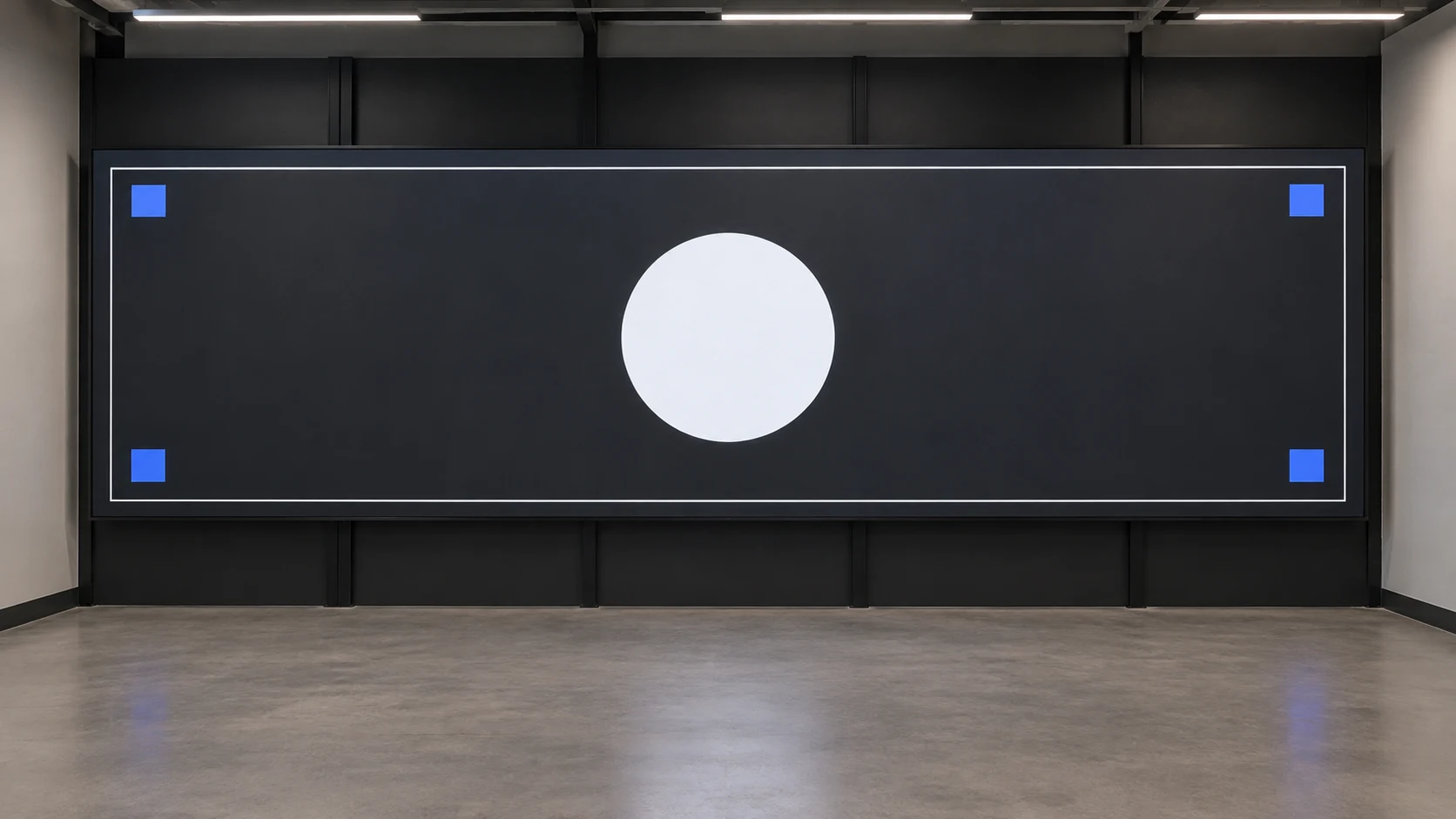
Prepare a short acceptance package containing an edge border, recognizable corner markers, a circle, representative text and one real campaign clip. The border helps reveal cropping or offsets; the circle helps expose unequal scaling. These patterns support diagnosis, but they do not replace a full commissioning procedure.
Play the package through the final source, switching equipment and LED processor. A pattern generated inside the processor can help check the downstream display, but it bypasses upstream playback and scaling. Passing that internal test does not prove that a delivered video file travels through the complete chain correctly.
Record the player’s output resolution and frame rate, the selected processor preset and every intentional crop or scale operation. The video processor input checklist helps separate source compatibility from content-layout decisions.
Then inspect the real clip at normal operating brightness. Check text, fine lines, gradients, motion and the transition between the last and first frame if it loops. A file that opens successfully is not necessarily a file that plays reliably for the intended schedule. Agree which person accepts visual layout and which person accepts playback behavior.
Specify the export, not just the filename extension
“Send an MP4” leaves important decisions unresolved. Ask the integrator or player supplier to confirm the supported codec and profile, frame dimensions, frame rate, bitrate range and relevant color settings for the installed playback system. If transparency, synchronized outputs or separate audio are required, include those requirements explicitly and test the proposed workflow.
Keep creative-master files separate from playback exports. The agency may need a high-quality editable master for later revisions, while the deployed player needs a specific tested deliverable. Do not assume that a larger file, a higher resolution or a different codec will improve the picture on this particular wall.
Name who performs final conversion. If the operator transcodes an approved agency file, the converted result should be checked again. The acceptance record should identify the deployed file, not only the source project that produced it.
Price the handover and future changes as separate work
Two content quotations can look similar while covering different responsibilities. One may include only a single export; another may include a reusable template, an on-site proof and adaptation to multiple screen formats. Compare those deliverables before comparing the total.
Ask the proposal to identify the owner of the pixel map, the number of creative formats, the test session, included revision rounds and the approval deadline. Separate a correction to an agreed template from a new request caused by a changed wall layout. That distinction prevents both the agency and installer from absorbing undefined rework.
At handover, retain the approved map, template, sample clip, export settings and a brief operator note together. Save the matching processor configuration through an appropriate LED display configuration backup procedure. Content files alone cannot restore an undocumented mapping preset.
Give future operators a simple release rule: use the current approved template, test changed content, and keep the previous working package available. A date-stamped folder and clear revision owner can be more useful than a large archive of files with nearly identical names.
Bring a complete content brief to the supplier
The best LED display content handover makes the connection between creative work and installed pixels explicit. Approve one representative package early, document the conversion path and preserve the settings used for acceptance. This reduces avoidable layout revisions without treating all screens or players as identical.
For a project discussion with Mirun, send your screen and content brief: installation dimensions, proposed pixel layout, viewing positions, source equipment, sample content, required languages and launch date. Ask which mapping, testing and content-adaptation tasks are included in the proposed scope, and which remain with your agency or local integrator.
Questions buyers often ask
Can we reuse the same video on several LED walls?
Sometimes. Walls with different aspect ratios may need different crops or compositions even when the player accepts the same file. Approve each display’s treatment of important subjects and copy. A shared creative master with separate playback exports can be a practical arrangement.
Does native-resolution content eliminate every scaling problem?
No. A native-sized file can still be resized by the player, operating system, switcher or processor. Verify the complete output path and the selected presets. Native dimensions describe the file; they do not prove that it reaches the wall unchanged.
Should the template be frozen before the wall is installed?
Approve a controlled design version early so production can begin, then confirm it against the final configuration. If installation changes the active pixel area or mapping, issue an updated template and identify which exports need revision. Avoid silently replacing the file that the creative team already approved.
Need help choosing the right LED display?
Tell us your installation scene, screen size, pixel pitch target and timeline. Mirun Hailian can help match the right product configuration.