How many pixel intervals fit across a logo stroke at P4.68?
Divide the physical stroke width in millimetres by the quoted pixel pitch in millimetres. At the L Series catalog pitch of 4.68 mm, a 14 mm stroke spans about 3.0 pitch intervals and a 28 mm stroke about 6.0. Count the lit rows on the supplier’s pixel map before approving artwork.
| Illustrative stroke | Stroke width (mm) | Nominal pitch (mm) | Design estimate (pitch intervals) | What to check on the proof |
|---|---|---|---|---|
| Narrow stroke | 14 | 4.68 | 14 ÷ 4.68 ≈ 2.99 | Count addressable rows through the narrowest section and around the inside curve. |
| Wider stroke | 28 | 4.68 | 28 ÷ 4.68 ≈ 5.98 | Compare the added lit area and confirm that adjacent openings still read clearly. |
Pitch intervals describe the spacing between neighbouring pixel centres. The number of rows that can light up depends on where the stroke lands on the grid, its angle and the clearance at the enclosure edge. Ask the supplier to show the grid and the addressable rows around thin diagonals and inside curves.
The L Series customizable P4.68 logo screen specifications list a 150 × 150 pixel example. Get a native pixel map for your approved outline and dimensions. For a broader check on resolution, shape and content, use the LED display native resolution planning guide.
How do you distinguish a physical cutout from a black part of the artwork?
Ask for a dimensioned front elevation that marks the enclosure edge, the active LED edge and each physical opening. A physical cutout exposes whatever is behind the display. A black region on a video frame still occupies part of the display face. Request a side view where rear supports or depth affect the view.
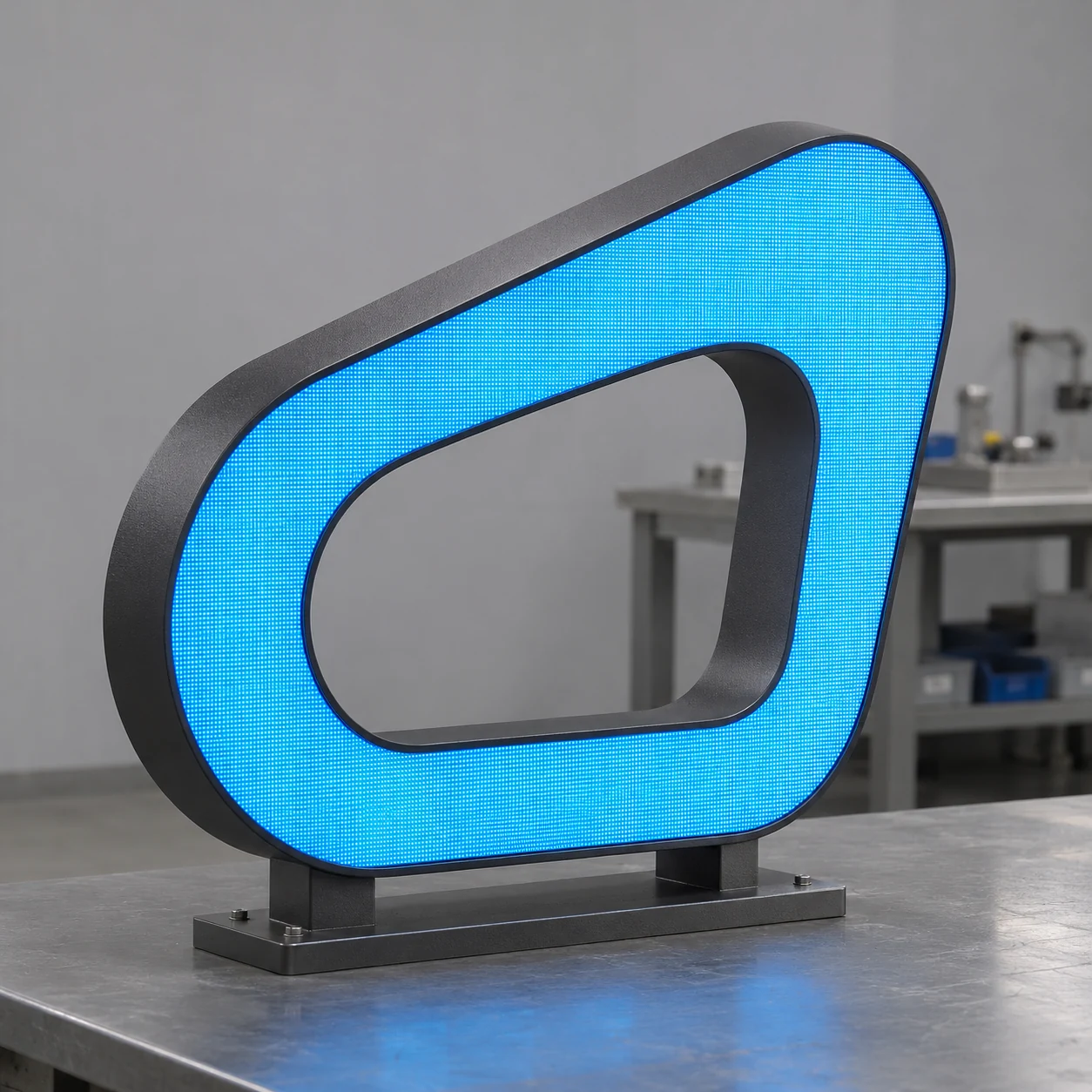
Label each opening with the intended view, such as exposed wall, a backing plate or an active section that displays black. For logos installed above eye level, review the opening from below as well. The rear structure and cabinet depth can change what customers see through the mark.
What should you ask the supplier to prove before fabrication?
Approve a dimensioned drawing and a native resolution pixel proof for the same revision, then inspect a powered sample of the hardest feature to reproduce. Compare a static logo, an animation frame and the display switched off from the nearest intended viewing position. Record any changes to the enclosure or mask.
- Drawing and pixel proof. Mark the physical perimeter, inactive trim, cutouts and addressable pixels. Label the smallest stroke or gap with its dimension and a grid location that the supplier can highlight.
- Powered sample or demonstration. Inspect the chosen detail close up, from the nearest audience position and from any important side angle. Switch the sample off to check the physical opening under the same viewing conditions.
- Content handover. Give the operator the approved native canvas dimensions, origin, orientation, active-pixel mask and one working export. Put the same revision on the drawing, mask and sample record.
If the powered sample covers only one feature, keep the remaining features on the final inspection list. Review affected drawings and the content mask together whenever the cabinet or outline changes.
What should you include in a custom logo LED screen quote request?
Send editable vector artwork, the intended overall dimensions, the mounting surface and the nearest viewing position. Highlight each stroke, opening and detached element the brand owner wants to preserve. Ask the supplier to itemize the active-pixel proof, powered sample, content map and access requirements in the LED display quotation.
Attach a front and side site photo and one representative content frame. State the site exposure and available depth. Compare the supplier’s drawings, sample, installation interfaces and handover deliverables against the LED display quotation scope guide.
Request a quote with Logo LED Screen preselected and include your marked-up vector file or a link to it.
Custom logo LED screen purchasing FAQ
Will a 14 mm stroke always show three lit rows at P4.68?
The 14 mm width gives about 2.99 nominal pitch intervals. To see how many rows can light up, check the addressable points on the proposed grid and confirm them on the powered sample. Ask to see the narrowest point on the curve as well as the straight section.
Can the small dot above our letter stay separate from the rest of the logo?
Ask for the illuminated outline and the physical support in one drawing. Review the dot at full scale to see how many pixels fit, then check whether a bridge or backing plate will be visible from the intended viewing positions. Submit any visible support for brand approval.
Can we reuse the same animation if we change the size of the logo screen?
Ask the content team to map the animation to the approved pixel canvas and mask for the new screen. Check a static frame and a moving frame at native resolution. Pay particular attention to small marks and to animation that crosses the active edge.
How much clearance should our installer leave behind a wall-mounted logo?
Ask for the dimensions and service route of the quoted enclosure. Review the space for the bracket, cable bends, connector access and the removal of serviceable parts. Confirm who supplies the mounting surface and where power and signal cables enter it.
What weather protection should appear in an outdoor L Series quote?
Describe where the display will be exposed to rain or dust, including the back and the cable entry. Ask the supplier to specify the protection and brightness of the proposed configuration and to identify the enclosure and installation conditions those figures cover.
Need help choosing the right LED display?
Tell us your installation scene, screen size, pixel pitch target and timeline. Mirun Hailian can help match the right product configuration.