Choosing between 500×500 vs 500×1000 LED cabinets looks like a simple size decision. For a rental buyer, it changes the cabinet count, wall-height increments, handling weight, locking points, flight-case plan, spare inventory, and the speed of repeated setup. The larger cabinet is not automatically more efficient, and the smaller cabinet is not automatically more flexible for every job.
The right answer depends on the screen layouts your team builds most often and how the cabinets will be transported, lifted, curved, serviced, and replaced. This guide gives you a practical way to compare both formats before you approve a rental LED display quotation.
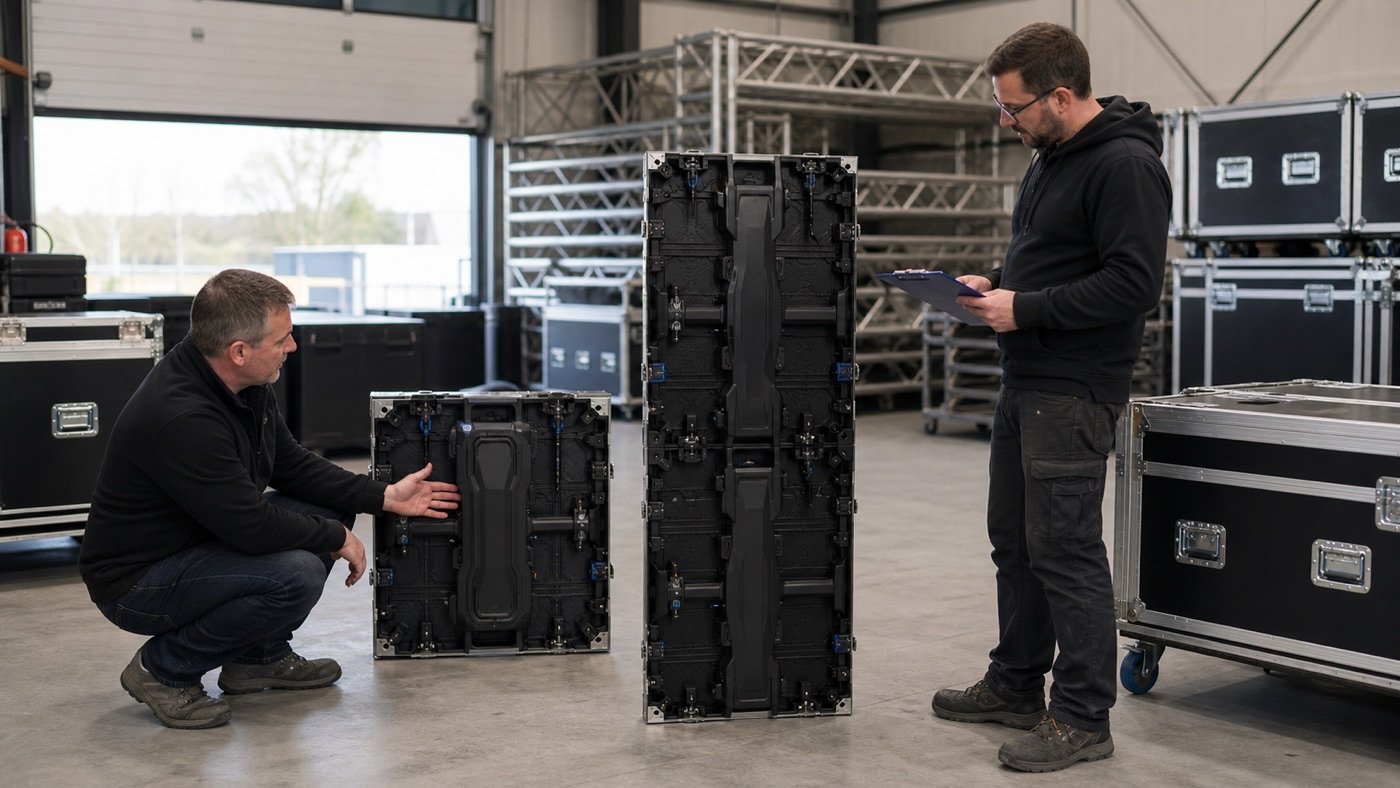
Start With the Screen Layout, Not the Cabinet Price
A cabinet format only makes sense in the context of the finished wall. A 500×500 mm cabinet adds half a meter of height at a time. A 500×1000 mm cabinet adds a full meter. That difference matters when your inventory must build low stage fascias, narrow side columns, irregular booth walls, or several screen ratios from the same stock.
Before comparing prices, list the screen widths and heights you expect to build during a normal season. Convert each layout into both cabinet formats. If a proposed format leaves repeated gaps, forces oversized walls, or requires a second cabinet family to finish common layouts, the apparent unit-price advantage may disappear.
For a broader view of available event-screen options, review the current rental LED display product page and the LED display product catalog before fixing the cabinet mix.
500×500 vs 500×1000 LED Cabinets: Practical Comparison
| Decision factor | 500×500 cabinet | 500×1000 cabinet | What the buyer should verify |
|---|---|---|---|
| Layout increments | Half-meter height steps | One-meter height steps | Build a cabinet map for your five most common screen sizes |
| Cabinet count | More cabinets for the same display area | Fewer cabinets for the same display area | Count locks, signal jumps, power jumps, and hanging points |
| Individual handling | Smaller and usually easier for one trained crew member to position | Taller and heavier; handling method needs confirmation | Check actual model weight, approved lifting method, and crew workflow |
| Curves and special shapes | Can give more layout granularity | Can reduce cabinet count on straight walls | Confirm curve hardware and permitted angles for the quoted series |
| Packing | More pieces and protective contact points | Fewer pieces but taller case compartments | Request a flight-case loading drawing and packed dimensions |
| Spare strategy | Useful for replacing smaller wall sections | One spare covers a larger wall section | Define whether cabinets, modules, power units, or receiving cards are the service spare |
These are planning implications, not universal product claims. Lock design, cabinet depth, curve capability, power architecture, weight, and service access vary by series. Ask the supplier to mark the exact model on every drawing and specification sheet.
Compare Weight at the Same Display Area
Do not compare cabinet weight without comparing equal display area. On Mirun Hailian’s current rental product page, the H/K small cabinet is listed at approximately 7 kg and the large cabinet at approximately 12.5 kg. Two 500×500 cabinets cover the same face area as one 500×1000 cabinet, so the listed cabinet weight is about 14 kg versus 12.5 kg before rigging hardware, cables, and packaging.
That 1.5 kg difference is useful for planning, but it should not decide the order by itself. The taller cabinet concentrates more weight in one item, while two smaller cabinets create an extra horizontal joint and additional handling steps. Ask your operations team which constraint matters more: individual lift weight, total truck weight, setup touches, or layout flexibility.
Count Connections and Locks, Not Just Cabinets
Fewer cabinets can mean fewer physical joints across a straight wall. That may reduce the number of locks a crew closes, cable jumps it checks, and cabinet edges it aligns. However, the exact benefit depends on how power and signal are distributed through the quoted system. A buyer should request a sample cabinet map rather than assuming every connection count will be cut in half.
Also ask how the two sizes mix within one wall. Confirm that locating pins, locks, power connectors, signal connectors, receiving-card configuration, color calibration, and front/rear surfaces remain compatible. Mixed sizes are valuable only when crews can assemble and service them without a second set of procedures.
Whichever format you choose, cabinet geometry still controls the final image. Use the LED display cabinet alignment checklist to define flatness, seam, and installation checks for factory and on-site acceptance.
Check Service Access and Spare Logic
A rental fleet is maintained cabinet by cabinet, but many failures are repaired at the module, power-supply, receiving-card, or cable level. Ask which parts can be swapped from the front and rear, how long common service tasks take, and whether the same service parts are used in both cabinet sizes.
If your screens are installed against walls, inside scenic structures, or in tight side-stage positions, compare the access plan in this front-service vs rear-service LED display guide. A cabinet mix that is convenient to rig can still be expensive to maintain if the crew cannot reach the parts that fail most often.
Build the Flight-Case Plan Before the Purchase Order
Cabinet format changes more than the screen. It changes case height, cabinet count per case, foam layout, caster loading, truck utilization, warehouse stacking, and the number of cases crews must move. Ask for the proposed case drawing, the number of cabinets per case, empty and loaded case weight, external dimensions, and the way accessories are separated.
Then test the plan against your real doors, ramps, elevators, trucks, and storage racks. A lower cabinet count is not helpful if the loaded case no longer fits the venue route or exceeds your handling policy. If your fleet travels frequently, include corner protection, spare foam, replacement casters, and case identification in the packing discussion.
RFQ Fields That Prevent a Vague Cabinet Quote
- Five most common screen widths and heights
- Expected percentage of indoor and outdoor use
- Ground-stacked, wall-mounted, or flown installation methods
- Maximum acceptable weight per cabinet and per loaded flight case
- Required mix of 500×500 and 500×1000 cabinets
- Pixel pitch and exact product series for each size
- Curved-wall requirements and approved angle range, if applicable
- Front and rear maintenance requirements
- Cabinets per flight case, case dimensions, and loaded case weight
- Spare cabinet, module, power unit, receiving card, and cable quantities
- Sample cabinet map with power and signal routing
- Compatibility confirmation between both cabinet sizes
Red Flags to Clarify Before You Order
- The quote lists both sizes but gives only one cabinet weight.
- The supplier cannot show how the sizes lock together in a mixed wall.
- Flight-case quantity is listed without loaded dimensions or weight.
- The cabinet map ignores real screen heights used by your events.
- Curved installation is promised without naming the hardware or angle limits.
- Spare cabinets are included, but service parts are not mapped to each series.
- Power and signal routing are left until after the purchase order.
The Best Choice May Be a Controlled Mix
For many rental businesses, the decision is not all small or all large. A controlled mix can use 500×1000 cabinets for the main straight area and 500×500 cabinets for half-meter height adjustments, side columns, fascias, or special layouts. The key word is controlled: define the ratio from actual jobs, keep the series compatible, and make the packing and spare plan easy for crews to follow.
Send Mirun Hailian your common screen sizes, installation method, indoor/outdoor use, viewing distance, delivery country, and preferred cabinet mix. We can match those requirements to the current rental series and prepare a cabinet layout for review. Request a rental LED display configuration before you finalize the purchase order.
Need help choosing the right LED display?
Tell us your installation scene, screen size, pixel pitch target and timeline. Mirun Hailian can help match the right product configuration.