Buying spare LED modules sounds simple: order the same pixel pitch and keep a few pieces for future repairs. In practice, two modules can share the same outside dimensions and still be poor replacements for each other. Mounting holes, connector positions, LED packages, driver ICs, scan design, power requirements, masks, firmware, and calibration data can all change how a replacement behaves.
The useful question is therefore not only, “Will this spare module turn on?” It is, “Can this module be installed, configured, calibrated, and serviced without creating a visible or electrical mismatch?” Buyers should define compatibility before production and preserve the evidence needed to qualify replacement modules years later.
What Does LED Display Module Compatibility Really Mean?
A compatible spare module should fit the cabinet, connect safely, accept the correct control configuration, and produce a visually acceptable result beside the installed modules. Passing only one of those conditions is not enough.
Mechanical compatibility covers dimensions, screw positions, magnets or latches, mask profile, cabinet clearance, and service direction. Electrical compatibility covers voltage, power connection, signal interface, pin orientation, driver IC, scan arrangement, and receiving-card configuration. Visual compatibility covers pixel pitch, LED package, brightness range, color behavior, black level, surface finish, and calibration.
Can a replacement light up and still be wrong?
Yes. A module may show an image while using a different driver configuration, brightness response, color characteristic, or mask finish. It may appear acceptable on a bright test pattern but reveal a patch at low brightness, on skin tones, or when viewed from an angle. A connector that physically fits also does not prove that its pin assignment and electrical requirements match.
Treat “powers on” as an initial observation, not an acceptance result.
Which Physical Details Must Match?
Start with the cabinet and service method. A replacement module must enter the opening, sit flat, align with neighboring modules, and be removable using the intended front- or rear-service tools.
Is matching the length and width enough?
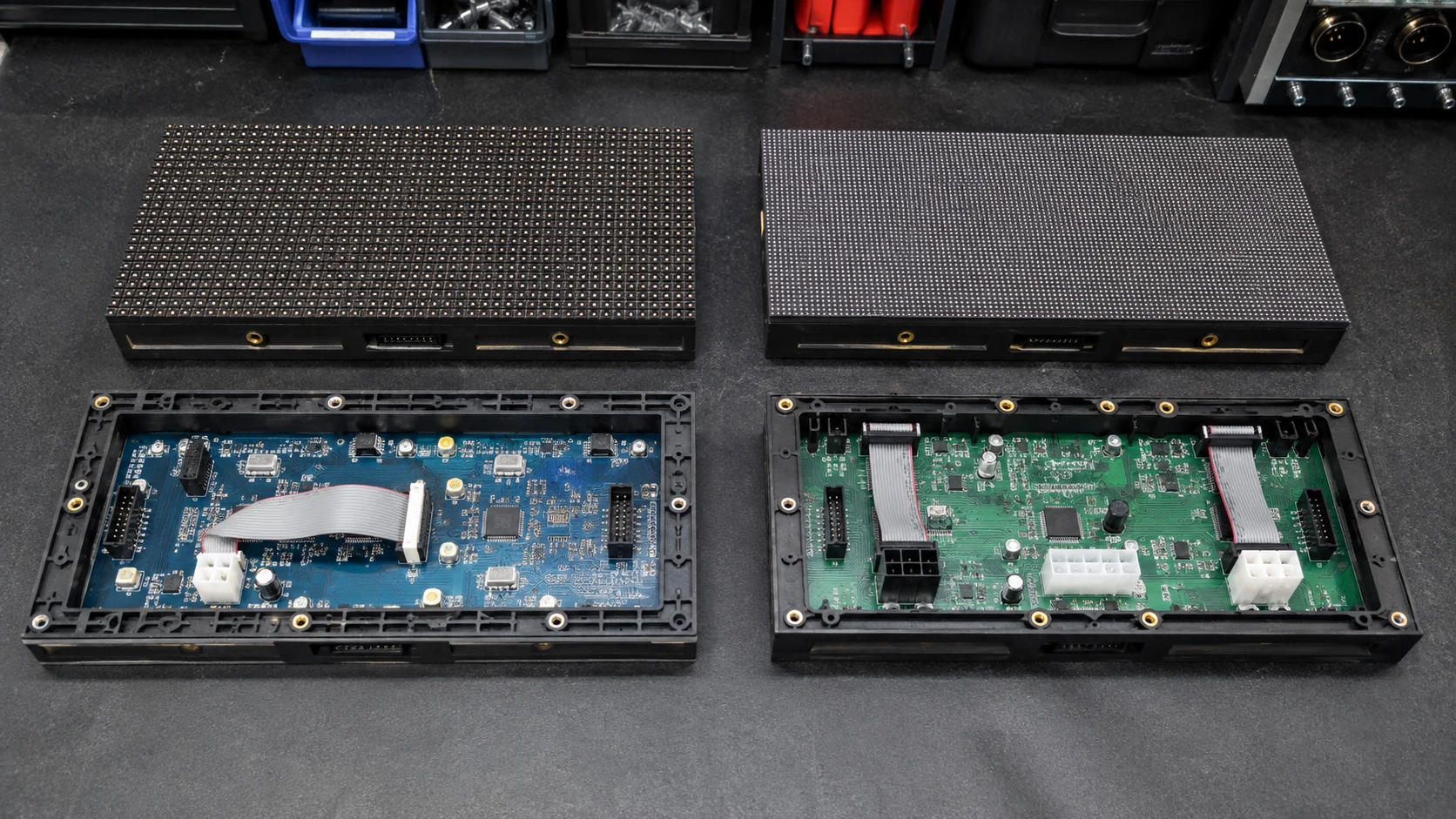
No. Record module length, width, depth, mounting-hole pattern, magnet or latch locations, connector clearance, and mask height. Even a small change in the plastic frame or mask can affect flatness, create a dark seam, or make the module difficult to remove.
The pixel pitch must also align across the module boundary. A module described with the same nominal pitch may still use a different pixel matrix or edge geometry. Ask the supplier to identify the exact module model and revision, not only the pitch and outer size.
What should buyers check around connectors and wiring?
Compare connector type, position, orientation, cable length, pin assignment, power polarity, and strain relief. The replacement should not require improvised adapters or cables that press against the cabinet. A service technician should be able to remove one approved module and install a spare without changing the cabinet wiring plan.
If the project uses multiple cabinet generations, keep a cabinet-to-module map. This prevents a visually similar spare from being installed in the wrong screen during an urgent repair.
Which Electronic Details Affect Compatibility?
The LED surface is only one part of the module. The driver and scan design determine how the module interprets control data and drives each pixel.
Why do driver IC and scan design matter?
Different driver ICs and scan arrangements may require different configuration parameters. A wrong configuration can cause missing rows, repeated image sections, color errors, unstable output, abnormal brightness, or a completely blank module. The effect may appear only at certain brightness levels or content patterns.
Ask for the module revision, driver IC information, scan arrangement, hub or adapter-board relationship, and approved receiving-card configuration. These items should be recorded in the project file rather than left as informal factory knowledge.
Can firmware or configuration make matching harder?
It can. Receiving-card firmware, mapping, data-group assignments, and saved configuration files form part of the working system. A replacement module may be electrically suitable but still fail when the wrong cabinet configuration is restored after maintenance.
Keep versioned records using the LED display firmware version control guide and preserve the files described in the LED display configuration backup checklist. Record which file belongs to each screen, cabinet series, receiving-card model, and module revision.
Why Can Matching Modules Still Look Different?
Two modules can be electrically compatible and still create a visible patch. The cause may be a component change, production variation, stored calibration data, or the different operating history of the old and new modules.
Does the production batch matter?
The batch can matter because LED packages, masks, PCB materials, driver components, and manufacturing processes may be revised over time. That does not mean every cross-batch replacement will fail. It means the supplier should qualify the proposed spare against the installed screen rather than assuming that the model name alone guarantees a visual match.
Useful evidence includes the original order reference, module model and revision, component records, test photos under controlled settings, and a retained sample or approved comparison method. Buyers should also ask how long the supplier expects to support that module design and what happens if a component becomes unavailable.
How do calibration and operating age affect the result?
Installed modules change through use and environmental exposure, while stored spares have a different history. A new spare may therefore look brighter or slightly different in color even when it was correct at the time of shipment. Calibration can reduce some differences, but it cannot repair a mechanical mismatch or make unrelated hardware identical.
The LED display color calibration guide explains why buyers should preserve original calibration data and define the process for recalibrating a repaired cabinet or screen area.
Can Spare Modules Come from a Different Production Batch?
Sometimes, but only after a documented compatibility check. The replacement should be approved for mechanical fit, electrical configuration, thermal behavior, image stability, and visual matching under the screen's normal operating conditions.
For a small indoor wall viewed at close range, a slight surface or color difference may be obvious. For a large outdoor screen viewed from farther away, the same difference may be less visible, but service safety and electrical compatibility still matter. The acceptance method should follow the real application rather than a universal statement that cross-batch modules are always acceptable or always unacceptable.
If the exact original module is no longer available, ask the supplier to state what changed, which parts remain compatible, whether the replacement requires a new configuration, and whether a larger zone should be replaced or recalibrated together.
What Should Buyers Put in the Spare-Module RFQ?
Do not request “extra modules” as an undefined line item. Tie the spare package to the delivered screen and its maintenance plan.
- Project or order reference and destination
- Screen and cabinet series
- Exact module model, revision, pixel pitch, and pixel matrix
- Module dimensions, depth, mounting method, and service direction
- LED package, mask version, driver IC, and scan arrangement
- Power and signal connector type, orientation, and pin assignment
- Compatible receiving card, hub board, firmware, and configuration file
- Calibration method and coefficient backup
- Required spare quantity by screen or cabinet inventory
- Packing, labeling, storage, and moisture-protection method
- Cross-batch substitution approval process
- Test evidence and responsible contact for future replacement questions
Use the broader LED display spare parts package guide to coordinate modules with power supplies, receiving cards, cables, and other service items. A module-only spare plan can still leave the maintenance team without the part that actually caused the fault.
How Should Buyers Test Module Compatibility Before Shipment?
Ask the supplier to test production modules and spares as one controlled set. The goal is not only to show that every module displays content, but to prove that a technician can identify, replace, configure, and evaluate a spare without hidden rework.
| Check | Why it matters | Useful acceptance evidence |
|---|---|---|
| Model and revision | Prevents a generic same-pitch substitute | Module list linked to the order and cabinet series |
| Dimensions and mounting | Confirms the module sits flat and can be removed | Measurement record and trial installation |
| Power and signal connections | Reduces wiring and polarity risk | Connector and pin-assignment record |
| Driver and scan configuration | Confirms correct image addressing | Approved configuration tied to the module revision |
| Full-white and primary colors | Reveals dead pixels and obvious color errors | Controlled test images or video |
| Low-brightness content | Reveals patches not obvious at full output | Side-by-side test at normal operating settings |
| Black image and dark scenes | Helps expose glow, leakage, or mask differences | Screen-area comparison in controlled light |
| Flatness and seams | Protects the finished visual surface | Close and normal-distance inspection |
| Service swap | Confirms the real maintenance procedure | Timed trial with the intended tools and cables |
| Backup restoration | Confirms files can be identified and reused | Versioned archive with a restoration record |
Record the approved test conditions. A supplier photo without the screen settings, module identities, or comparison method is difficult to use later.
How Does Compatibility Planning Affect Maintenance Cost?
Good compatibility planning reduces diagnosis time, emergency shipping, screen downtime, and the chance of buying parts that cannot be used. It also makes quotations easier to compare because the spare package is defined by function and evidence instead of quantity alone.
Should every project use the same spare strategy?
No. A permanently installed screen may need long-term traceability, labeled storage, and a clear replacement route for a local maintenance team. A rental company may value a larger interchangeable inventory that can move across cabinets and event layouts. A close-view studio wall may require tighter visual matching than a distant outdoor billboard.
The maintenance team should know where the spares are stored, which screen they belong to, how to handle them, and which files to load. Include those tasks in the LED display maintenance training checklist rather than handing over unlabelled cartons at project completion.
How Can Mirun Hailian Support Spare-Module Planning?
Huizhou Mirun Hailian Technology Co., Ltd. supplies LED display solutions for rental, indoor, outdoor, transparent, and creative applications. For a new project, the practical starting point is to define the screen, cabinet series, module revision, control system, service method, spare quantity, labeling, configuration backup, and acceptance evidence together.
For an existing screen, send the original order reference when available, clear photos of the module front and back, dimensions, connector details, cabinet and receiving-card information, configuration files, and images of the visible fault. These details help determine whether an exact replacement, a qualified alternative, calibration work, or a broader repair plan should be discussed.
Conclusion
LED display module compatibility is more than matching pixel pitch and outside dimensions. A useful spare must fit the cabinet, connect safely, accept the correct driver and control configuration, and produce an acceptable visual result beside the installed screen.
Define compatibility before ordering, identify every spare by screen and revision, preserve firmware and configuration files, and test replacement procedures under realistic settings. If another production batch may be used, require a documented qualification process instead of relying on the model name alone. That preparation turns spare modules from shelf inventory into parts the maintenance team can actually use.
FAQs
Q1: Can I use any LED module with the same pixel pitch?
No. Matching pixel pitch does not confirm dimensions, mounting points, connector pinout, driver IC, scan design, voltage, mask profile, configuration, or visual characteristics. Confirm the exact approved module model and revision.
Q2: How many spare LED modules should a buyer order?
There is no single quantity for every project. Base the decision on screen size, module count, project criticality, access, expected operating life, delivery distance, storage conditions, and the supplier's future support plan. Ask for the quantity and its assumptions as a separate quotation line.
Q3: What should I send when requesting a replacement module?
Send the order reference, screen and cabinet model, module front and back photos, dimensions, connector positions, labels if present, receiving-card information, configuration files, and images of the fault. Do not connect an unverified replacement only because its plug fits.
Planning spares for a new screen or trying to identify an existing module? Send Mirun Hailian the project details, module photos, dimensions, control information, destination, and required schedule for a compatibility discussion.
Need help choosing the right LED display?
Tell us your installation scene, screen size, pixel pitch target and timeline. Mirun Hailian can help match the right product configuration.