An LED display can look clean at full brightness and still lose shadow detail when it is dimmed for a meeting room, studio, theatre, or evening event. Dark gradients may turn into visible steps. Neutral gray may shift toward red, green, or blue. Cabinets that appear matched on a white test pattern may reveal patches in darker content.
That is why LED display low-brightness grayscale should be treated as an acceptance condition, not just a bit-depth number in a quotation. The useful question is: “Can this exact screen, control system, and calibration hold smooth, neutral detail at the brightness our project will actually use?” Buyers should define the test before approving the configuration.
What Does Low-Brightness Grayscale Mean on an LED Display?
Grayscale describes the brightness steps a display can reproduce between black and its brightest output for each color channel. At the darker end of that range, each small step has a large visual effect. A missing or uneven step can appear as banding, speckle, a color cast, or a sudden jump out of black.
Low-brightness operation is a different condition from simply showing dark content at maximum screen brightness. The screen itself may be dimmed to suit the room or camera exposure, reducing the usable range in which the LEDs and driver electronics reproduce small changes.
Is grayscale the same as source bit depth?
No. A 10-bit or 12-bit source describes the values available in the incoming signal. The display must still process and reproduce those values through the controller, receiving card, driver IC, LED package, brightness setting, and calibration data. NovaStar’s official grayscale explanation also distinguishes source color depth from the brightness levels that the driver can achieve.
A high number on one component does not prove the complete chain will show a smooth dark gradient. Buyers need a result measured or observed on the proposed configuration.
Why Is Full-Brightness Approval Not Enough?
Bright test patterns are useful for checking dead pixels, color order, mapping, and obvious uniformity problems. They are weak evidence for dark-scene performance. Small differences between color channels or cabinets can be hidden at high output and become noticeable when the wall is dimmed.
This matters most when the project uses low room light, controlled camera exposure, extended fades, dark brand content, subtle backgrounds, or skin tones beside black areas. Brompton Technology’s low-brightness guidance notes that reducing LED output can make artifacts such as banding and lost dark detail more visible. Its documentation also explains that low-brightness behavior depends on compatible panel processing and operating modes, not a headline setting alone.
The buying decision should therefore separate three questions:
- Can the screen reach the required maximum brightness for the site?
- Can it be dimmed to the real operating level without objectionable artifacts?
- Can it move smoothly between those levels under representative content?
Use the LED display brightness guide to define the site requirement first. Then add a low-brightness acceptance test rather than assuming the maximum figure covers both conditions.
Which Project Inputs Should Be Fixed Before Testing?
A low-brightness comparison is meaningful only when the test conditions are recorded. Start with the planned application, ambient light, viewing distance, content type, normal brightness range, source format, frame rate, controller, receiving-card configuration, firmware, and calibration state.
For camera-facing work, also record the camera model, frame rate, shutter setting, ISO or gain, lens, exposure, and intended shooting distance. For direct-view applications, record the room lighting and where the approval team stands. A supplier video filmed with automatic exposure is not a controlled comparison because the camera may conceal or exaggerate the defect.
Should buyers specify one universal brightness percentage?
No. A percentage shown in control software is not necessarily the same luminance across different screens, configurations, or operating modes. Define a practical condition instead: the target room state, the screen luminance when measured, and the control settings used to reach it.
If a project has several use cases, test more than one state. A conference wall might need a bright presentation mode and a dim video mode. A rental screen may need daylight output, an indoor stage look, and a camera-friendly rehearsal setting. Each approved state should be saved and named clearly.
What Defects Should Buyers Look For?
Low-brightness problems are easier to discuss when the acceptance team uses the same vocabulary.
- Banding: smooth gradients break into visible rings or steps.
- Black crush: several dark source levels appear as the same black area, hiding detail.
- Brightness jump: the first visible step above black appears too abruptly.
- Color cast: neutral gray leans red, green, or blue at certain levels.
- Mottling or speckle: pixels or small areas vary irregularly in dark content.
- Cabinet patching: cabinet boundaries become visible even though the wall looks uniform at high brightness.
- Flicker or scan artifacts: the image appears unstable to the eye or camera at the agreed settings.
- Poor fade behavior: a fade-to-black shows sudden steps, flashes, or different panels disappearing at different times.
Do not use one defect as a substitute for all the others. A screen can have a smooth gradient but still show a low-level color cast. It can look acceptable to the eye but show scan artifacts on camera. The test must match the intended use.
How Should the Test Content Be Prepared?
Use controlled patterns plus representative project content. Test patterns isolate specific behavior; real content shows whether the behavior matters in practice. The package should include dark gray fields, neutral ramps, color-channel ramps, slow fades, shadow-rich stills, moving gradients, and the actual type of video or graphics the operator expects to show.
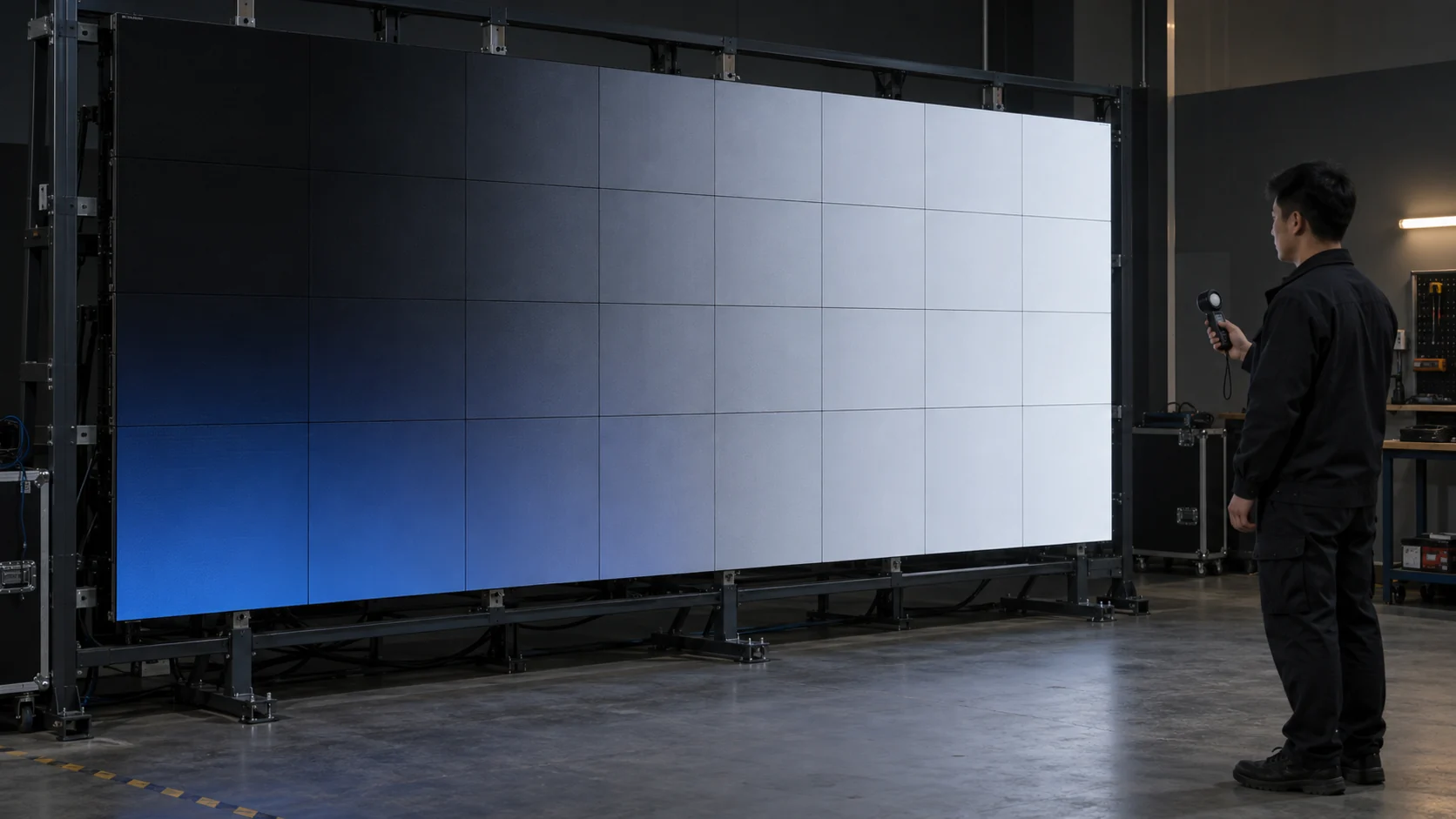
Avoid generated labels or screenshots whose color management is unknown. Keep the master files, playback device, output range, resolution, scaling path, and processor settings consistent across suppliers. If one bidder plays a compressed clip through a laptop while another uses a controlled test generator, the comparison is not fair.
How long should the wall operate before approval?
Long enough to reach the thermal condition expected during normal use. LED output and color can change as panels warm. Record the warm-up state and repeat critical dark-field checks after the system has stabilized. Do not invent a universal time; ask each supplier to state the required stabilization method for the proposed hardware and verify it during acceptance.
Should the Human Eye or a Camera Be the Final Judge?
Use the observer that matches the project. For a lobby or meeting room, the direct-view experience from the normal audience positions is primary. For broadcast, virtual production, theatre capture, or corporate streaming, the camera image is part of the product and needs its own approval.
Camera testing must be coordinated with refresh behavior. A screen may look stable to an observer but show lines or brightness variation at a particular frame rate and shutter setting. The LED display refresh-rate guide explains why the quoted refresh value should be connected to the actual camera workflow.
Record both the screen settings and camera settings with every approved clip. “Looks good on camera” is not reusable evidence if nobody knows how the result was produced.
How Do Calibration and Processing Affect the Result?
Low-brightness performance belongs to the complete image chain. LED packages and driver behavior matter, but so do receiving-card configuration, calibration coefficients, gamma, color temperature, brightness-control method, processor settings, firmware, and the selected operating mode.
Calibration at a bright level does not automatically prove uniformity at low gray. NovaStar documentation describes dedicated low-grayscale correction functions for brightness spikes, dips, color cast, and mottling. Brompton’s PureTone documentation similarly describes compensation for different nonlinear responses in the red, green, and blue channels. These examples are useful because they show why buyers should ask which functions are supported and enabled on the exact delivered hardware.
Do not request a feature name without defining the expected result. Ask the supplier to demonstrate the screen with the feature disabled and enabled when practical, save the approved configuration, and explain any trade-off with maximum brightness, refresh behavior, or compatibility. Coordinate this work with the broader LED display color-calibration checklist.
What Should Buyers Compare Across Quotations?
Two proposals that both state “high grayscale” may include very different evidence and scope. Ask every supplier to answer the same questions:
- What LED module, driver IC, receiving card, controller, and firmware are included?
- Which source formats and bit depths are accepted through the proposed input path?
- What normal and low-brightness operating states will be configured?
- Which grayscale, gamma, calibration, and low-brightness processing functions are supported?
- At which brightness, room-light, viewing, frame-rate, and shutter conditions will the screen be tested?
- Which test patterns and representative content will be used?
- Who supplies the test source, playback device, camera, meter, and operator?
- What visual defects or tolerances require correction before acceptance?
- Are configuration files, calibration data, presets, test media, and records included in handover?
- What changes if modules, receiving cards, firmware, or processors are substituted?
Input and scaling decisions upstream can also change the result. Confirm the complete signal route using the LED video processor input checklist before the factory test is scheduled.
Which Acceptance Tests Should Be Written into the Order?
The acceptance plan should name the condition, method, evidence, and correction responsibility. A short table is more useful than a broad promise of “good image quality.”
| Test | Condition to record | What to inspect | Evidence to retain |
|---|---|---|---|
| Dark gray fields | Screen brightness, room light, warm-up state | Mottling, cabinet patches, color cast | Unedited wide and close views |
| Neutral grayscale ramp | Source file and signal path | Banding, lost steps, non-neutral gray | Source file plus recorded result |
| RGB ramps | Gamma and color settings | Channel-specific jumps or clipping | Three channel results |
| Slow fade to black | Playback frame rate and duration | Steps, flashes, unequal fade-out | Full continuous video |
| Representative dark content | Approved project media | Lost detail and distracting artifacts | Before/after setting comparison |
| Camera test | Camera, lens, distance, frame rate, shutter, exposure | Scan lines, flicker, moiré, color shift | Original camera clip and settings |
| Bright-to-dim transition | Preset names and switching method | Delay, sudden change, image instability | Recorded preset change |
| Warm-state repeat | Operating duration and temperature condition | Drift from initial approval | Repeat images and notes |
| Power-cycle recovery | Saved configuration and startup sequence | Correct preset and calibration return | Recovery record |
| Spare-module check | Module batch and calibration method | Visible replacement patch at low gray | Replacement test result |
Add these checks to the LED display commissioning checklist. The order should also say whether corrections occur before shipment, during site commissioning, or through an agreed service process.
What Should Be Included in the Handover Package?
Keep the approved source files, processor project, receiving-card configuration, calibration database, brightness presets, gamma and color settings, firmware versions, test photos and videos, camera settings, measurement records, and a short restoration procedure. Files should identify the screen, date, hardware revision, and approval state.
If the operator is expected to change brightness, define which control is safe to use and which settings must remain locked. Include a return-to-approved-state procedure. A helpful handover lets the local team restore the accepted picture without guessing which of several similarly named files is current.
How Can Mirun Hailian Support the Approval Process?
Huizhou Mirun Hailian Technology Co., Ltd. supplies LED display solutions for indoor, outdoor, rental, transparent, and creative applications. For a low-brightness discussion, the useful starting inputs are the application, screen dimensions, viewing distance, ambient-light range, source format, normal and minimum operating brightness, camera workflow when relevant, installation schedule, and required test evidence.
Those inputs allow the proposed module, driver, control chain, calibration scope, presets, and acceptance method to be reviewed as one system. The aim is not to promise that one configuration fits every venue. It is to make the quotation and approval conditions specific enough that the delivered screen can be tested fairly.
Conclusion
LED display low-brightness grayscale cannot be approved from a bit-depth label or a full-brightness photo. Buyers should test the exact screen and control configuration at real operating brightness, using controlled gradients, slow fades, representative content, and the intended viewing or camera conditions.
Define the defects to inspect, keep the settings with the evidence, and require the approved configuration in the handover package. That turns “high grayscale” from a vague quotation phrase into a repeatable acceptance result.
FAQs
Does a higher grayscale specification guarantee smoother dark images?
No. It describes only part of the potential signal or processing range. Actual results also depend on the LED module, driver behavior, receiving-card settings, calibration, brightness mode, processor, source path, and test conditions.
Can low-brightness performance be checked from a supplier video?
A video can be useful screening evidence, but it is not enough unless the source, screen settings, room light, camera exposure, frame rate, shutter, and processing path are controlled and disclosed. Final approval should use agreed conditions on the production configuration.
What should I send for a low-brightness test plan?
Send the application, screen size and viewing distance, ambient-light range, content samples, source resolution and frame rate, normal and minimum brightness needs, camera model and settings when relevant, acceptance location, destination, and schedule.
Planning a screen for a dim venue or camera workflow? Send Mirun Hailian your project conditions, content samples, brightness range, camera requirements, destination, and schedule to define a comparable configuration and test plan.
Need help choosing the right LED display?
Tell us your installation scene, screen size, pixel pitch target and timeline. Mirun Hailian can help match the right product configuration.