“HDR supported” sounds like a complete image-quality answer, but it is usually only a starting point. On an LED display, HDR depends on the source, transfer curve, processor, receiving cards, LED package, calibration, screen luminance, and the content itself. A panel can accept an HDR signal and still fail to preserve the highlights, shadow detail, or color relationships that the production team expects.
For buyers, the useful question is not whether a quotation contains the word HDR. It is whether the proposed screen can reproduce the agreed HDR workflow at the intended brightness, color space, frame rate, and camera or audience position. Define that test before comparing brands or approving a sample.
Is HDR a screen feature or a complete signal-chain result?
HDR is a system result. The source must carry a compatible transfer function and color space. The processor must recognize or correctly override the metadata. The LED system must map the signal into its real luminance and color limits. Calibration must keep the result consistent across cabinets and over the operating range.
Official processor documentation commonly lists PQ/HDR10 and HLG as different transfer functions, not interchangeable marketing labels. Brompton’s HDR documentation, for example, separates PQ-HDR10, HLG, SDR, and color spaces such as Rec.2020, DCI-P3, and Rec.709. NovaStar’s MCTRL4K manual also ties HDR settings to screen peak luminance, ambient light, and low-grayscale behavior. Those details matter because the same source can look different when the display is mapped for a different peak level or room condition.
Treat the specification as a chain:
- Content and source: mastering luminance, transfer function, bit depth, frame rate, chroma format, and metadata.
- Processor path: input type, decoding, scaling, HDR mode, color-space mapping, latency, and presets.
- LED hardware: LED package, driver IC, receiving card, optical mask, cabinet uniformity, and real luminance range.
- Calibration: white point, gamma tracking, color correction, low-end behavior, and cabinet-to-cabinet consistency.
- Operating condition: ambient light, screen brightness, viewing distance, camera exposure, and warm-up state.
The result should be approved as one configuration, not inferred from a processor brochure.
When does HDR improve an LED display project?
HDR is most useful when the content has meaningful highlight and shadow information: virtual production, broadcast graphics, premium retail video, product films, museum content, and controlled corporate or event environments. It can make bright reflections, saturated colors, and near-black detail easier to separate when the complete chain is calibrated for that content.
It is less useful when the source is ordinary SDR, the room is too bright for the intended black level, or the display is operated far below the condition used for the HDR demo. A high peak-luminance claim cannot repair clipped source material, incorrect metadata, poor calibration, or a camera workflow that was never tested.
If your project is mainly a meeting room, lobby, or signage wall, first define the normal viewing condition with the LED display brightness guide. Then decide whether HDR content is frequent enough to justify the extra processing, test time, and operator training.
What should buyers specify before asking for an HDR quotation?
Write the image target in project language rather than asking for “the best HDR.” Record the intended content, display size, viewing distance, ambient-light range, normal and peak operating brightness, source resolution, frame rate, camera requirements, and the expected color space.
At minimum, ask suppliers to state:
- Which transfer functions are supported: SDR gamma, PQ/HDR10, HLG, or another defined curve?
- Which input interfaces carry the required format: HDMI, DisplayPort, SDI, fiber, or a specified media-server path?
- What bit depth is accepted, processed, and output under the proposed mode?
- Which color spaces or custom gamut targets can be selected and measured?
- What screen peak luminance and ambient-light condition are used for the demo?
- Which receiving cards, driver ICs, firmware, and calibration functions are included?
- Does the HDR mode change refresh rate, latency, grayscale, power, or available processing features?
- How are SDR presets restored when the operator switches content?
This turns a broad image promise into fields that can be compared in an RFQ.
Is a higher peak brightness always better for HDR?
No. HDR is not a race to the highest number. A screen that is too bright for the room can lift black levels through reflections, fatigue viewers, and force the operator to dim the system into a less predictable part of its range. A lower peak target may be more appropriate for an indoor studio or meeting room if the screen can preserve highlight separation and neutral shadows at that operating point.
Ask for the target peak luminance, the measured room light, the screen preset, and the content master used to produce the result. Keep those four items together in the approval record.
How do wide color gamut and color accuracy differ?
Wide color gamut describes the range of colors the system can reach. Color accuracy describes how closely the displayed colors match the target after calibration. A wider gamut is not automatically more accurate; an uncalibrated screen can produce saturated colors that are attractive but wrong.
For a meaningful comparison, name the target color space and the measurement method. Rec.709 may be correct for one workflow, while DCI-P3 or a custom target may be appropriate for another. Brompton’s HDR documentation lists standard and custom color-space handling, while ROE Visual’s technical material explains that color gamut, bit depth, gamma tracking, and dynamic range all contribute to image quality. These are useful reminders to compare the target and the evidence, not just the phrase “wide gamut.”
The LED display color-calibration checklist can help organize white point, gamma, uniformity, and measurement responsibilities. Ask who owns the calibration file, when it is created, and what happens if a module or receiving card is replaced.
Which parts of the processing path can break HDR?
The most common failures occur between the source and the LED modules. A media server may output 10-bit HDR, but a processor preset may interpret it as SDR. Metadata may be stripped by a scaler. A color-space conversion may compress saturated colors. A low-latency mode or frame-rate conversion may be incompatible with the selected HDR path.
Ask the supplier to draw the actual signal route, including source, switcher, processor, fiber or copper links, receiving cards, and panel data. Confirm the expected resolution, frame rate, chroma sampling, bit depth, and transfer function at each hand-off. Use the LED video processor input checklist to keep this discussion concrete.
The receiving card is also part of the image chain. It may control brightness, gamma, calibration, and low-grayscale behavior. A processor that accepts HDR cannot compensate for a panel configuration that clips highlights or loses the lowest useful steps. Test the delivered module, card, firmware, and preset together.
What content should be used for an HDR acceptance test?
Use controlled patterns and representative media. A single colorful demo reel is weak evidence because it can hide clipping, banding, and color errors. Build a short test package with:
- near-black and shadow ramps for low-end detail;
- neutral gray steps for banding and color cast;
- white and highlight ramps for clipping and peak-luminance behavior;
- saturated red, green, blue, cyan, magenta, and yellow patches;
- skin tones, foliage, sky, reflective metal, and dark textured content;
- slow fades and moving gradients;
- the actual camera frame rate, shutter, exposure, and lens when the wall is filmed.
The LED display low-brightness grayscale guide is useful for the shadow portion of this test. HDR approval should extend that discipline into highlight roll-off and color-space handling.
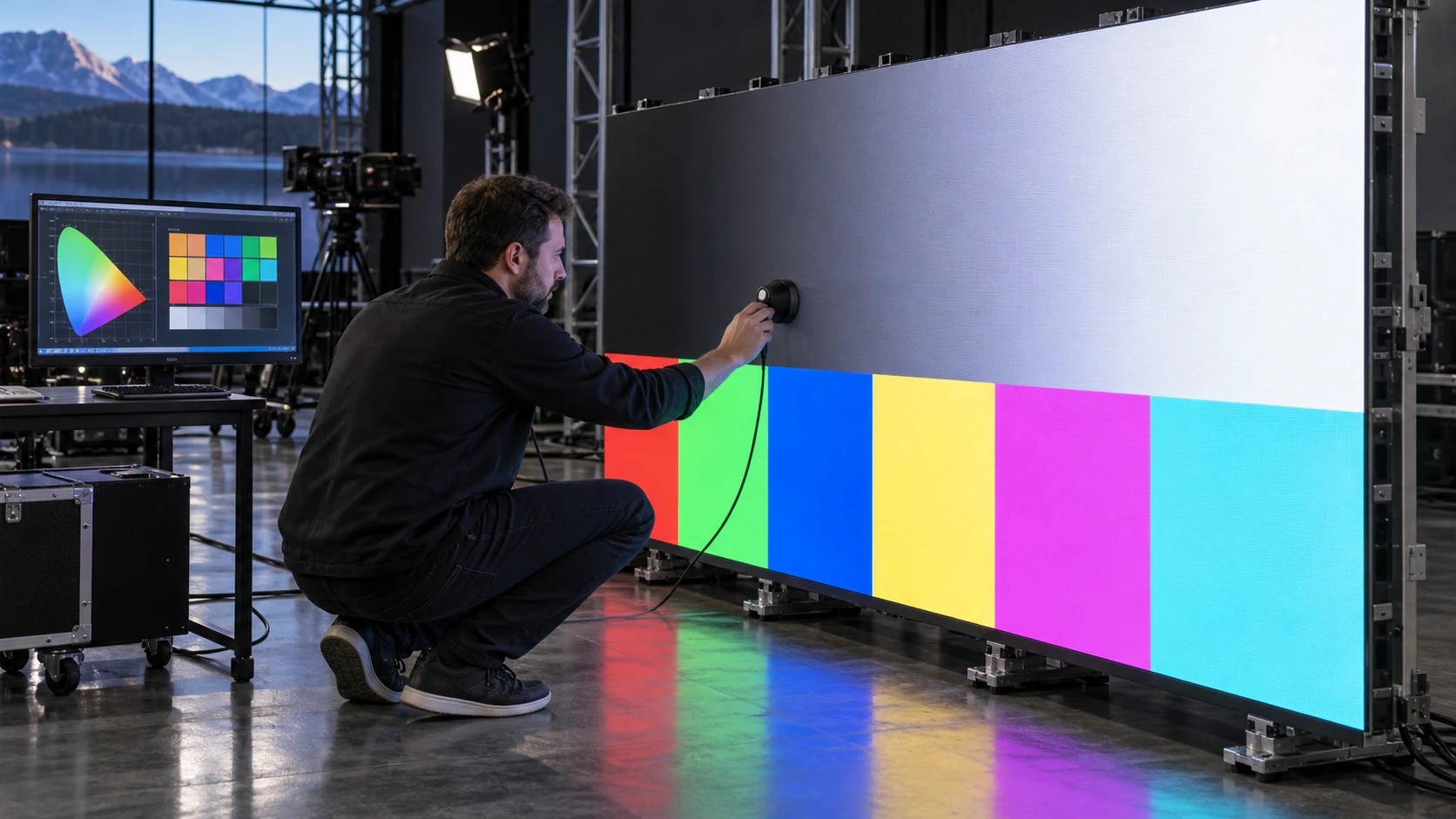
The visual test should be observed from normal audience positions and, when relevant, through the production camera. Record the screen preset and source settings with every clip. Do not accept a supplier video with automatic exposure and no signal information as final proof.
What should be measured and retained at acceptance?
The order should define the condition, evidence, and correction path. A compact acceptance matrix is more useful than a general statement that the display is HDR-ready.
| Test | Condition to record | Inspect | Evidence to retain |
|---|---|---|---|
| HDR signal lock | Source, input, transfer function, bit depth | Correct mode and metadata | Processor status capture and settings file |
| Peak highlight ramp | Target peak luminance and ambient light | Clipping, color shift, unstable brightness | Continuous ramp video and luminance record |
| Near-black ramp | Screen brightness, room light, warm-up state | Black crush, banding, color cast | Wide and close recordings |
| Neutral gray steps | Gamma, white point, preset | Non-neutral steps or jumps | Pattern result with calibration version |
| Gamut patches | Named color space and measurement tool | Out-of-gamut clipping, channel imbalance | Colorimeter report and patch images |
| Representative HDR clip | Approved master and playback path | Skin tones, reflections, foliage, shadow texture | Original clip and source checksum |
| Camera workflow | Camera, shutter, frame rate, ISO, lens | Scan lines, flicker, exposure mismatch | Original camera file and settings |
| SDR fallback | SDR preset and switching method | Incorrect gamma or washed-out color | Recorded preset change |
| Warm-state repeat | Operating duration and temperature condition | Drift from the initial result | Repeat test and notes |
| Module replacement | Spare module and calibration method | Visible mismatch after replacement | Replacement result and updated file |
Include the approved processor project, receiving-card configuration, calibration database, firmware versions, presets, test media, measurement records, and restoration procedure in handover. The LED display commissioning checklist provides a broader framework for assigning these records.
Can one screen support HDR, SDR, and live-event content?
Usually, but the answer depends on the selected processing platform and operating modes. Ask for named presets rather than a vague promise of compatibility. Each preset should identify the transfer function, color space, peak target, brightness limit, frame rate, latency setting, and operator switching method.
Test the transitions as well as the steady states. A preset that looks excellent in a factory demo may be difficult to restore after a power cycle or may change unexpectedly when a source loses metadata. The operator should know which settings are safe to change and which must remain locked.
For camera-facing work, also verify that the HDR preset does not create a new scan or timing problem. Refresh rate and camera shutter are linked; use the LED display refresh-rate guide to define the production condition.
Questions to put in the RFQ
Before comparing prices, ask every supplier to answer the same questions:
- What exact HDR formats, color spaces, bit depths, and input interfaces are included?
- Which LED module, driver IC, receiving card, processor, firmware, and calibration mode are proposed?
- What peak luminance, ambient light, and room condition define the quoted result?
- Which measurements will be supplied, by whom, and with what instrument?
- Which HDR features are unavailable when low latency, redundancy, 3D, or frame conversion is enabled?
- How will the system handle missing or incorrect metadata?
- What is the approved SDR fallback and how is it restored after a restart?
- Are factory and site tests included, and which party supplies the source, camera, meter, and operator?
- What changes if the final media server, receiving card, firmware, or module batch differs from the demo?
These questions make a “wide-gamut HDR” line item auditable and help separate included engineering from later site work.
How can Mirun Hailian support the project?
Huizhou Mirun Hailian Technology Co., Ltd. supplies LED display solutions for indoor, outdoor, rental, transparent, and creative applications. For an HDR or wide-gamut review, send the application, screen dimensions, viewing distance, ambient-light range, content masters, source resolution and frame rate, camera workflow, target color space, brightness range, destination, and schedule.
Those inputs allow the proposed screen, processor path, calibration scope, presets, and acceptance evidence to be reviewed as one project. The goal is not to label every screen as an HDR solution. It is to make the conditions clear enough that the delivered result can be compared with the content your team actually needs to show.
Conclusion
LED display HDR should be purchased as a tested signal-chain result, not as a badge on a panel datasheet. Define the transfer function, color space, bit depth, peak target, ambient light, processor path, calibration state, and camera or audience condition before approving the quotation.
Use controlled ramps, gamut patches, representative HDR media, and named SDR fallback presets. Retain the settings and measurements in the handover package. That is how buyers turn “HDR and wide color gamut” into a repeatable project requirement.
FAQs
Does HDR automatically mean wide color gamut?
Not necessarily. HDR video is often associated with wide color gamut, but the source, processor, and display still need an agreed color-space target and a verified mapping path.
Is 10-bit input enough to guarantee HDR quality?
No. Bit depth is only one part of the chain. Transfer function, gamut, gamma tracking, luminance mapping, calibration, and the delivered LED configuration also affect the visible result.
Can buyers approve HDR from a demo video?
A demo can screen suppliers, but final approval should use the proposed hardware and recorded source, processor, brightness, color-space, camera, and room conditions.
What should I send for an HDR LED display quotation?
Send the screen size, viewing distance, application, ambient light, content samples, source format, frame rate, target color space, camera requirements, destination, and schedule. Contact Mirun Hailian to define a comparable test plan.
Need help choosing the right LED display?
Tell us your installation scene, screen size, pixel pitch target and timeline. Mirun Hailian can help match the right product configuration.