What does LED display automatic brightness control do?
An ambient light sensor measures illuminance in lux at its mounting point. The controller uses a curve to select an output setting within the operating limits agreed for the site. Measure the resulting screen luminance in nits with a separate meter and save each reading alongside the active setting.
A time schedule can set different permitted output ranges for operating periods. Use a sensor when output needs to respond to changing light within those periods, and ask the supplier how the selected controller combines both rules. Look up the FS3.91 cabinet format in the Mirun FS Series outdoor LED display configurations.
Where should the ambient light sensor be installed?
Place the sensor where its reading represents the light incident on the screen face. Check for shadows from the structure, light from the display itself, reflection from glazing and nearby lamps. Compare the proposed position with a reference lux reading before fixing the bracket, and confirm the cable route and maintenance access.
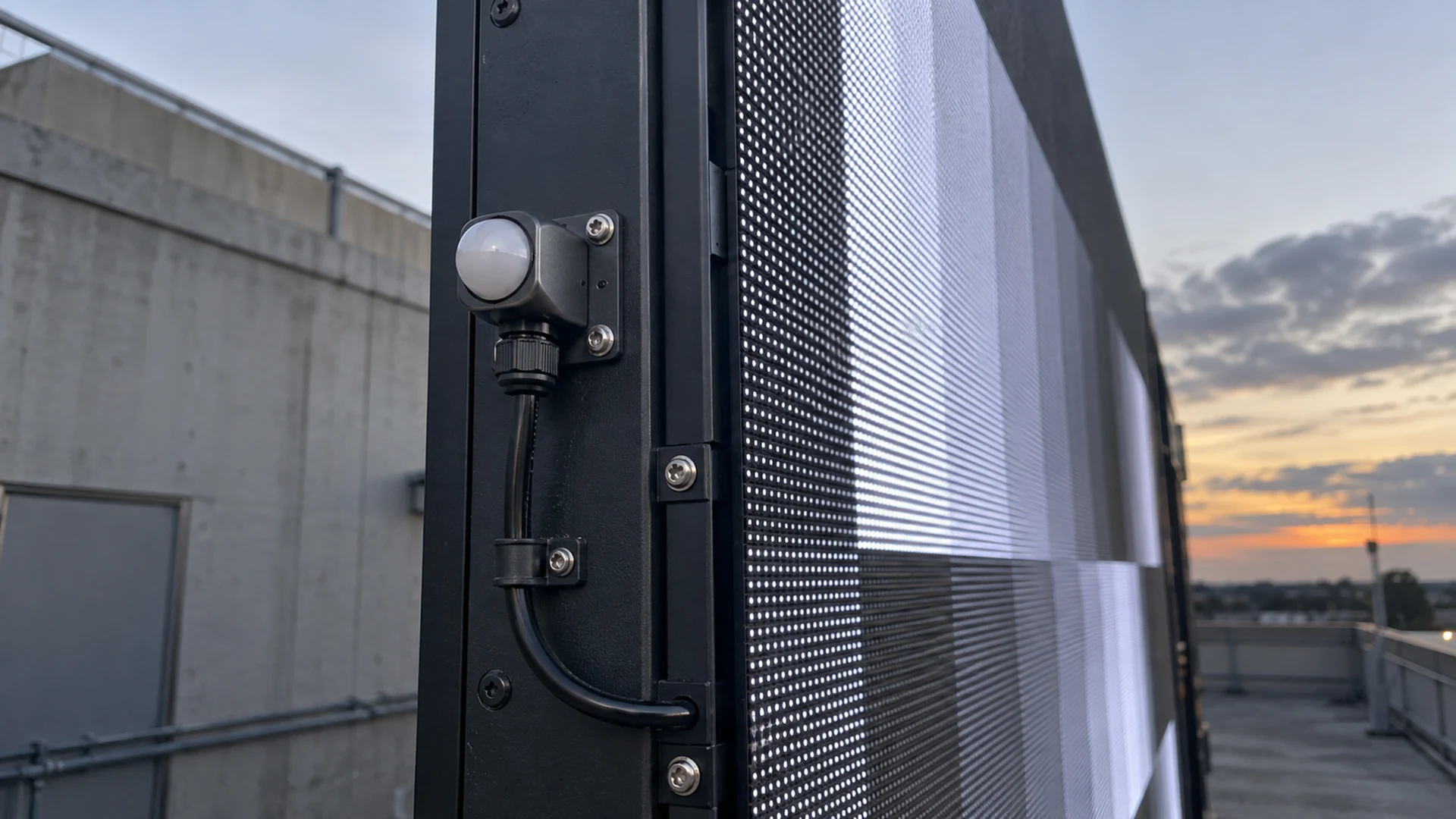
For a double-sided sign, compare both faces as sunlight and nearby lighting change. Specify separate sensors or curves if one reading cannot represent both faces. If NovaStar hardware is proposed, the NS060 requires a compatible device with a light-sensor connector. Confirm the offered interface and firmware against the NovaStar NS060 specification V1.1.4.
How do you set and test an automatic dimming curve?
Log ambient lux, the commanded output and measured display luminance at representative daylight, dusk and evening conditions. Use agreed content and meter geometry to compare results. Set the site limits, then adjust the curve, delay and ramp to keep text legible and prevent repeated brightness changes when the reading hovers near a breakpoint.
| Operating condition | Illustrative sensor reading (lux) | Trial controller setting (%) | Evidence to record |
|---|---|---|---|
| Daylight | 15,000 | 75 | Measure screen luminance in nits with the agreed pattern. Check text at the normal viewing distance. |
| Dusk | 1,200 | 30 | Measure luminance and record how the screen transitions as ambient light rises and falls around a breakpoint. |
| Evening | 80 | 10 | Measure luminance, check it against the agreed evening limit and inspect a dark gradient and typical content at intended viewing positions. |
Controller percentage is a command. Obtain nits by measuring the installed screen instead of multiplying the catalog brightness by the command. At the dimmest approved level, use neutral ramps, small light text and dark footage to look for banding, loss of shadow detail and cabinet-to-cabinet colour shifts. Use the low-brightness grayscale test guide to prepare patterns.
How should the display respond if control inputs are lost?
Write a separate response for missing sensor data, loss of the management network and restart of the controller. Agree which local preset or schedule takes over, who receives an alert, and when automatic control resumes. Limit manual override to approved users and specify its allowed range, expiry and return behaviour.
For the example plaza, one option to quote is a locally stored, site-approved evening preset during sensor failure and local automatic control during loss of the remote network. Ask the integrator to demonstrate whether each behaviour is supported with the proposed hardware and firmware. Witness sensor recovery, loss of remote access, controller restart and override expiry in an agreed test window. Record the clock and output state on restart.
What should the supplier prove at commissioning and handover?
On the finished screen, compare sensor and reference readings, verify the curve in stable and changing light, and test fallback and manual override. Log time, weather, content, controller command, measured luminance and observed image quality. Ask who supplies the instruments, who approves limits and who keeps the configuration after commissioning.
Save the sensor position and photos, firmware versions, curve, output limits, fallback settings, alarm recipients, and the signed test record. If the display appears on camera, repeat transition checks with the agreed camera settings. Ask each bidder to separate equipment, programming, commissioning, monitoring and support using the LED display manufacturer’s quotation scope guide.
For a fixed outdoor wall, request an outdoor LED display quote with automatic dimming. Send screen size and orientation, photos at daylight and after dark, operating hours, intended content, known site limits and the required fallback behaviour.
Automatic brightness control buying FAQ
Can I calculate nits from the brightness percentage on my controller?
Measure luminance in nits with the agreed content, geometry and calibration. Record the controller setting alongside the result. Settings can produce different luminance on different hardware or with different calibration.
Can one light sensor control both faces of an outdoor LED sign?
Use one sensor only if its readings represent both faces and the control system supports that layout. Opposite orientations, canopies or nearby lighting can justify a second sensor and a separate curve.
Will automatic dimming keep working when the site loses internet?
It can if the sensor, curve and any required schedule run on local hardware. Ask the supplier to demonstrate the quoted controller with its remote connection unavailable and confirm what its local clock and diagnostics retain.
What happens when the photocell stops reporting at night?
Use the fallback agreed for the site and verified on the offered controller. Include the fault alert, approved output or shutdown schedule, and automatic recovery conditions in the purchase specification.
Does a lower brightness setting tell me how much electricity I will save?
Log electricity use under the expected brightness schedule and playback content. Power depends on the display configuration, content and operating hours. Use the measured operating profile to estimate annual savings.
Need help choosing the right LED display?
Tell us your installation scene, screen size, pixel pitch target and timeline. Mirun Hailian can help match the right product configuration.