An LED wall can look neutral in a supplier photo and still appear too blue, too warm, or visibly different from nearby displays after installation. For a dependable LED display color temperature specification, buyers should define the content standard, target white point, normal brightness, ambient-light condition, camera requirements, measurement method, adjustment authority, and acceptance records. A Kelvin value alone is not a complete approval target.
The practical decision is not “Which color temperature is best?” It is “Which white should this project reproduce, under which operating conditions, and how will the finished wall prove it?” That answer changes between broadcast, virtual production, corporate rooms, retail, events, museums, and outdoor advertising.
What do color temperature and white point mean on an LED display?
Color temperature is a convenient way to describe whether a displayed white appears warmer or cooler. White point is the actual chromaticity target the display is adjusted to reproduce. The two terms are related, but they should not be treated as interchangeable proof of accuracy.
A controller may show a Kelvin setting while the measured white still sits away from the intended chromaticity. The result can also change with brightness, calibration data, LED batch, cabinet temperature, viewing angle, and other color controls in the processing path. Buyers should record both the named target and the measurement evidence.
For standard HDTV production, ITU-R BT.709 defines D65 as the reference white. That does not make D65 a universal rule for every signage or event project. It means a D65 white point is a logical starting point when the content and production chain are based on BT.709. The approved target should follow the real workflow rather than a default copied from another installation.
Is 6500 K always the correct LED display white point?
No. A value near 6500 K is commonly associated with D65, but the project still needs a defined content and viewing context. Corporate video, broadcast graphics, product photography, a stage camera, architectural lighting, and an outdoor advertising loop may not be judged under the same conditions.
Use the following decision order:
- Identify the source content standard and the white point used during creation or grading.
- Define the normal operating brightness and ambient-light range.
- Confirm whether the audience, cameras, or adjacent displays are the primary reference.
- Select a target the complete LED system can reproduce consistently.
- Measure and approve the finished wall in its real operating state.
For camera-facing work, do not choose a warmer or cooler wall only to make one camera preset look convenient. Align the camera, lighting, content pipeline, processor, and LED wall as one system. If multiple camera bodies or lighting states will be used, include them in the test plan.
Why can the same Kelvin setting look different?
The number shown in software is a command, not a guarantee of the measured result. Two LED walls set to the same value can look different because their emitters, calibration, control paths, brightness levels, ambient reflections, and operating temperatures differ.
Common causes include:
- different LED batches or cabinet revisions;
- white-point correction applied in more than one menu;
- color-space conversion upstream of the LED processor;
- a target created at one brightness and judged at another;
- mixed operating hours or replacement modules;
- nearby warm lighting, daylight, colored walls, or reflective finishes;
- measurement instruments, positions, or warm-up times that do not match;
- camera auto white balance or exposure changes during the comparison.
Product platforms also handle the controls differently. Brompton’s official Colour Temperature guidance describes a global temperature control for its Tessera environment. Its Dynamic Calibration documentation separately explains input color-space white-point targets and warns that they are not the same control. This is a product-specific example of why buyers should ask where each correction occurs instead of assuming every “6500 K” field performs the same job.
Which project inputs should be fixed before calibration?
White-point approval should happen after the main operating conditions are defined. Otherwise, a technician may produce a good result for a temporary demo state that the owner never uses again.
Record these inputs before factory or site testing:
- application and critical content types;
- content color space and transfer function;
- target white point or approved reference display;
- normal and maximum operating brightness;
- room lighting, daylight, façade lighting, and reflective surfaces;
- audience positions and any critical side views;
- camera bodies, lenses, frame rates, shutter settings, and lighting cues;
- processor, receiving-card, firmware, calibration, and preset versions;
- whether multiple walls must match each other;
- replacement-module and spare-cabinet workflow.
This work complements, but does not replace, the broader LED display color-calibration checklist. Calibration addresses uniformity and correction across pixels, modules, or cabinets. White-point approval defines the neutral reference the project actually wants to maintain.
How should buyers run an LED display color temperature test?
Test the finished signal chain, not an isolated cabinet with an undocumented processor preset. Use the planned source, processor, receiving configuration, calibration data, brightness, and environmental condition.
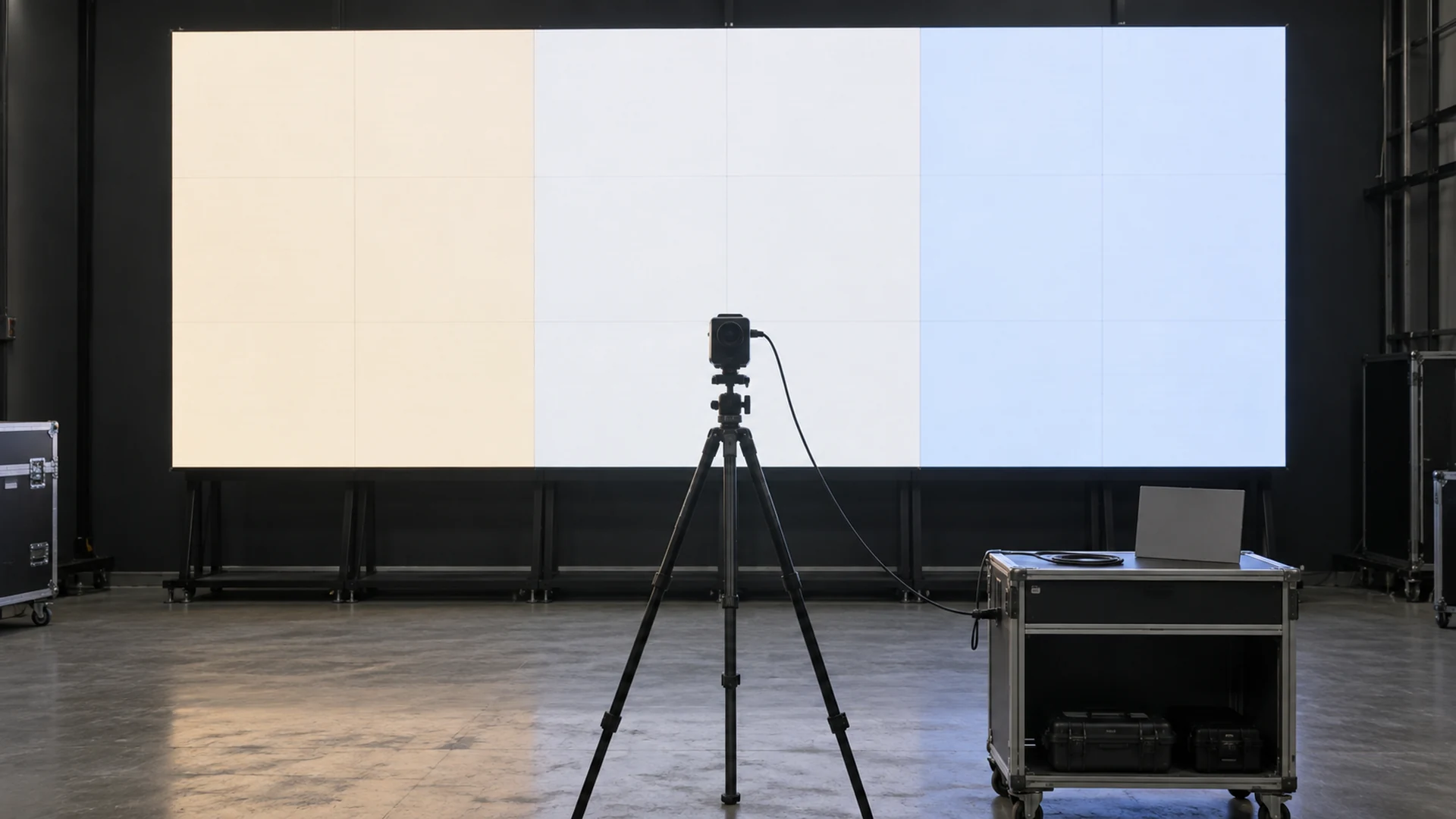
Use this sequence:
- Stabilize the system. Allow the display, processor, measurement instrument, and room condition to reach the agreed operating state.
- Load the approved configuration. Record the processor preset, receiving-card file, calibration data, input format, color space, gamma or transfer function, brightness, and active color controls.
- Remove automatic changes. Disable camera auto white balance, automatic exposure, unapproved ambient-light responses, and any processor setting that would change during the measurement.
- Measure the white target. Use a suitable calibrated instrument from the documented position and geometry. Record chromaticity, luminance, target, tolerance, instrument, and timestamp.
- Check several output levels. Review white and neutral gray at the normal operating level and other approved levels. A target that works at maximum output may drift when the wall is dimmed.
- Inspect the full wall. Look for cabinet blocks, warm or cool edges, seam differences, and areas affected by mixed batches or temperature.
- Use representative content. Include neutral product images, faces when relevant, brand colors, gradients, dark scenes, and the project’s actual media.
- Repeat critical views. Check the normal audience position, important side positions, and every approved camera position.
- Save the evidence. Export the configuration and calibration files, record results, photograph the setup, and identify the person authorized to change the target later.
The measurement should be repeatable. “It looked good in the room” is useful visual feedback, but it is not enough to restore the same result after a controller replacement, firmware change, or service visit.
What should the acceptance table contain?
| Approval field | What the buyer should define or request |
|---|---|
| Content reference | Source format, color space, transfer function, reference monitor or approved content file |
| White target | Named illuminant or chromaticity coordinates, plus the permitted tolerance |
| Operating state | Brightness, ambient light, warm-up period, processor preset, firmware, calibration file |
| Measurement setup | Instrument model, calibration status, distance, angle, measurement area, and room condition |
| Visual review | Neutral gray, white, faces or products, brand colors, dark content, gradients, and side views |
| Camera review | Camera body, lens, frame rate, shutter, exposure, white-balance method, lighting state |
| Multi-wall matching | Which displays must match, their positions, and the agreed comparison method |
| Service test | Replacement module or cabinet procedure and how the restored area is approved |
| Evidence | Results, photos, screenshots, exported files, exception list, signatures, and date |
The tolerance should be agreed by the project’s qualified color, broadcast, AV, or lighting team where the application demands it. A supplier can state what its platform supports and perform the approved procedure, but it should not invent a universal tolerance for every venue.
How do ambient light and brightness change the decision?
Human perception judges white relative to its surroundings. A wall near warm architectural lighting may appear cooler than the same wall in a neutral room. Daylight through glass, colored décor, reflective floors, haze, and stage lighting can also change the visual judgment without changing the processor setting.
Brightness matters too. LED output, grayscale behavior, color correction, reflections, and camera exposure interact. Approve the white point at the level the screen will normally use, then check any other required day, night, rehearsal, show, maintenance, or emergency preset.
Coordinate this work with the LED display automatic-brightness plan. An automatic system should not move the wall into an unapproved operating range where the white point or low-gray image no longer meets the project target.
For dark content, repeat the test alongside the low-brightness grayscale checklist. A correct white measurement at one bright patch does not prove neutral shadows or smooth gray ramps.
How should multiple LED walls be matched?
Start with one approved reference wall and one documented state. Then compare the other walls using the same source, processor logic, brightness, measurement instrument, position, and environment where practical.
Do not force unrelated environments to share one number without testing. A studio background, a side return, a ceiling display, and a lobby wall may experience different reflections, viewing angles, panel types, and brightness requirements. The useful goal is a planned visual relationship, not a spreadsheet value detached from the installed scene.
When displays must match on camera, record the approved camera and lighting configuration. Coordinate the white-point review with the project’s camera and moiré test so that color changes are not confused with exposure, scan, focus, or shutter artifacts.
What belongs in the quotation and scope?
Compare a measured white-point workflow, not a line that says “color temperature adjustable.” One quotation may include only access to a slider. Another may include the instrument, technician, night or rehearsal visit, camera session, multi-wall matching, correction files, report, training, and return visit.
Ask bidders to separate:
- supported white-point and color-space controls;
- measurement instrument and calibration responsibility;
- factory test, site test, and camera-test hours;
- ambient-light or blackout requirements;
- processor, receiving-card, firmware, and software versions;
- creation and storage of presets and calibration files;
- matching of spare modules, cabinets, and additional walls;
- operator permissions and change-control procedure;
- exclusions, travel, access equipment, retesting, and future service.
A lower price may be reasonable when the integrator or production team owns the remaining work. It is not comparable when the approval method and responsibility are simply missing.
Which red flags should stop approval?
- The proposal gives only a Kelvin number with no content or measurement context.
- The supplier demonstrates white balance at maximum brightness while the project will operate much lower.
- A camera set to automatic white balance is used as the only proof.
- The technician changes several color controls but cannot identify which corrections are active.
- Only the center cabinet is measured while the full wall shows warm and cool regions.
- Multiple displays are compared with different sources, presets, or brightness levels.
- Replacement modules are excluded from the white-point workflow.
- No configuration, measurement record, or rollback file is handed over.
What should be saved at handover?
The handover pack should include the approved white target, content standard, operating brightness, ambient-light condition, processor and firmware versions, calibration data, preset names, measurement instrument and geometry, full results, photographs, camera and lighting settings, multi-wall relationship, replacement-module procedure, exceptions, authorized users, rollback method, and the date of approval.
Use consistent terms—LED display, white point, color temperature, chromaticity, brightness, processor, receiving card, calibration file, reference content, and operator. Clear entity names help technicians reproduce the setup and help search or AI systems interpret the page without turning a project-specific target into a universal claim.
How can Mirun Hailian support the white-point plan?
Huizhou Mirun Hailian Technology Co., Ltd. supplies LED display solutions for commercial, event, retail, transportation, sports, and other project applications. To prepare a useful proposal, send the display size, pixel pitch, installation type, content standard, target white point, normal brightness, ambient-light condition, camera use, control-system preference, number of displays, destination, and schedule.
Mirun Hailian can use those inputs to clarify the display, control, testing, documentation, and handover scope. Contact Mirun Hailian with the desired operating result rather than only requesting “6500 K.”
Conclusion
LED display color temperature should be approved as a measured project condition, not a slider value. Define the content reference, white point, brightness, ambient environment, camera workflow, measurement method, tolerance, responsibility, and handover evidence. Then test the complete installed system at the states people will actually use.
Frequently asked questions
What is the difference between LED display color temperature and white point?
Color temperature describes a warm-to-cool white appearance, usually with a Kelvin value. White point is the actual chromaticity target. A Kelvin setting can be useful, but measurement is needed to prove that the display reaches the intended white point.
Is D65 the same as 6500 K?
D65 is a defined standard illuminant used as the reference white in systems such as ITU-R BT.709. It is often described as approximately 6500 K, but a generic 6500 K controller setting does not by itself prove D65 chromaticity.
Can white point be adjusted by eye?
Visual adjustment can help identify a preferred direction, but critical approval should use a suitable calibrated instrument and documented conditions. Human perception adapts to surrounding light, and different observers may not judge the same white identically.
Should factory and site measurements use the same target?
Usually the target and core configuration should remain traceable, but site reflections, lighting, brightness, and camera conditions may require a documented final adjustment. Record both stages and identify which site state is the approved master.
Does a correct white point guarantee accurate color?
No. White point is one part of color performance. Color gamut, primary coordinates, gamma or transfer-function tracking, grayscale, uniformity, processing, and source content also affect accuracy.
When should the white point be checked again?
Recheck after replacement modules or cabinets, controller or receiving-card changes, firmware or calibration updates, major brightness changes, relocation, significant aging, or a change to the content, lighting, or camera workflow.
Need help choosing the right LED display?
Tell us your installation scene, screen size, pixel pitch target and timeline. Mirun Hailian can help match the right product configuration.